


The gap between 2 techs and 20 isn't about trucks or marketing. It's about repeatability. When you're running two guys, you are the SOP — you know which customer needs the back gate code, who pays late, which panel always has a nightmare behind the cover. Your head holds the whole operation.
Then you hire tech #4, #7, #12, and the business starts leaking in ways you can't see until the callbacks pile up. The "I didn't know we were supposed to photograph that." The dispatcher who booked a service-plan customer into a two-hour window that needed four.
Most owners try to fix this by writing SOPs. Then those SOPs die in a Google Drive folder nobody opens. The problem was never the document — it was that the SOP had no owner, no enforcement point, and no way to tell if anyone actually followed it.
This pack is built differently. Every template here has three things attached: who owns it, where it gets enforced (the gate), and what "working" looks like as a number. That's the difference between a binder and an operating system.
Why most field service SOP templates fail (and what makes one stick)
A SOP fails when it's a description instead of a gate. "Techs should photograph the panel before starting work" is a description. Nobody can be out of compliance with a suggestion. Compare that to: "Job cannot move to In Progress in the FSM until a before-photo of the panel is attached — dispatcher confirms on the morning board." Now it's a gate. There's a moment where someone either did it or didn't.
The second failure is ownership. If everyone owns the onboarding checklist, nobody does. Each template below names a single role responsible for it — not a person, a role, so it survives turnover.
Third is measurement. You need an adoption target with a deadline, or you'll never know if the rollout worked. Shops that successfully scale past 10 techs share one consistent trait: they didn't write better SOPs, they measured adoption and killed the ones nobody used.
Every template in this pack carries four fields:
| Field | What it means | Example |
|---|---|---|
| Owner role | Single role accountable | Dispatch lead, Field supervisor, Office manager |
| Enforcement gate | The exact moment it's checked | FSM status change, morning board, invoice release |
| Acceptance criteria | How you know it worked | Adoption ≥90% within 90 days |
| Copy/paste example | Drop straight into FSM notes or binder | (included per template) |
If a template in your own binder is missing any of these four, it will not survive your next three hires. That's not pessimism — it's just what happens.
The 90/180/365 rollout logic
Don't deploy everything at once. Crews reject a dozen new rules in week one and quietly go back to the old way. The rollout waves below are sequenced by what breaks first as you grow.
Never miss a job or delay a dispatch again.
Voltzly helps you schedule, assign, and track every electrical job efficiently.
- Unified job scheduling
- Real-time technician tracking
- Automated client notifications
No credit card required
-
First 90 days the stuff that bleeds money immediately — intake accuracy, job-acceptance photos, completion QA, and new-hire onboarding. These touch revenue and callbacks directly.
-
Days 90–180 coordination layers — dispatcher confirmation scripts, parts/asset logging discipline, escalation routing. These matter once you have enough volume that handoffs get sloppy.
-
Days 180–365 safety incident documentation, the formal pilot playbook for future SOPs, and tightening adoption thresholds on the early wins.
If this sequencing feels like a lot and you're earlier in the maturity curve, the operational maturity roadmap for small electrical contractors lays out which foundations need to exist before these SOPs will hold.
Wave 1, Template A — New-hire onboarding checklist + 30/60/90 training plan
The most expensive hire is the one who's technically fine but doesn't know your workflow. They do good electrical work and still generate callbacks because they skipped the photo step or didn't log the parts they pulled from the van.
Owner role: Field supervisor Enforcement gate: New tech cannot run solo calls until Day-30 sign-off is complete in the system. Acceptance criteria: 100% of new hires have a completed 30/60/90 record; first-90-day callback rate for new hires within 1.5× of veteran rate.
Day 1–7 checklist (copy/paste):
-
Van inventory walkthrough + photo of correctly stocked van
-
FSM login, job status flow demo (how to move a job through each stage)
-
Shadow 3 full calls with a senior tech — observe only
-
Review the three non-negotiable gates
before-photo, parts log, completion QA
-
Safety orientation + PPE check signed
Day 8–30:
-
Run calls paired, new tech leads, senior observes
-
First solo-capable sign-off
supervisor reviews 5 of the tech's completed jobs for photo + log compliance
-
One recorded intake-to-completion job reviewed together
Day 31–60:
-
Solo on standard calls; complex/panel jobs still paired
-
Weekly photo-pack spot check (supervisor pulls 3 random jobs)
Day 61–90:
-
Full solo scope per skills gate
-
90-day review
callback count, average job time vs. estimate, QA pass rate
The mistake that shows up constantly: shops let new techs go solo in week one because they're short-handed. Then they spend the next six months cleaning up habits that never got set right. The 30-day gate costs a little capacity now and saves you a trained-in bad habit that'll take forever to undo.
Wave 1, Template B — Intake & booking scripts (phone + online)
Bad intake is where margin dies before a truck even moves. A customer says "my breaker keeps tripping" and the office books a 60-minute diagnostic. Tech arrives to a Federal Pacific panel, a finished basement, and a customer who "also wanted a quote on an EV charger while you're here." Now the schedule's blown for the rest of the day.
Owner role: Office manager / dispatch lead Enforcement gate: Booking cannot be confirmed until all required intake fields are filled in the FSM. Acceptance criteria: ≥90% of bookings have complete required fields within 90 days; same-day reschedules due to bad scope trending down.
Phone intake script (copy/paste skeleton):
-
"Thanks for calling [Shop]. So I get the right tech and the right parts on the truck, a few quick questions —"
-
What's happening, and when did it start?
-
Is anything currently without power? (safety triage)
-
How old is the home, roughly? Do you know your panel brand?
-
Is this the only issue, or anything else you'd like looked at while we're there?
-
Can you text me 2–3 photos of the panel and the area before we come out? I'll send a link."
That photo request is the single highest-leverage line in the script. A photo-first scope lock kills the "I didn't know it was that panel" surprise, and it feeds directly into how the tech preps the van.
Online booking form required fields:
-
Issue description (free text) + category dropdown
-
Property age range
-
Photo upload (minimum 2, flagged required)
-
Anything-else field
-
Access notes (gate code, pets, parking)
Shops that scaled intake well stopped treating the form as optional convenience and made photo upload a hard-required field. Conversion dipped a few percent on bookings, but the jobs that came through were clean and dispatchable.
Wave 1, Template C — Job-acceptance gate (photo, parts logging, ETA)
Owner role: Field supervisor (enforced by dispatcher at the board) Enforcement gate: Job cannot move from "Dispatched" to "In Progress" in the FSM until before-photo + ETA confirmation are attached. Acceptance criteria: ≥90% of jobs have an acceptance-gate record within 90 days.
The acceptance gate is a three-part moment when the tech arrives:
-
Before-photo — panel/work area captured before any work starts. This is your warranty and your dispute insurance.
-
Parts logging — anything pulled off the van gets logged against the job, not reconstructed from memory at invoicing.
-
ETA confirmation — tech texts the customer an updated arrival/completion window, logged in the system.
> ✅ Before-photos attached (panel + work area) > ✅ Parts staged & logged: ___ > ✅ Customer ETA confirmed via text at ___ > Job approved to start — [tech initials]
Here's a simple visual of the acceptance gate workflow.
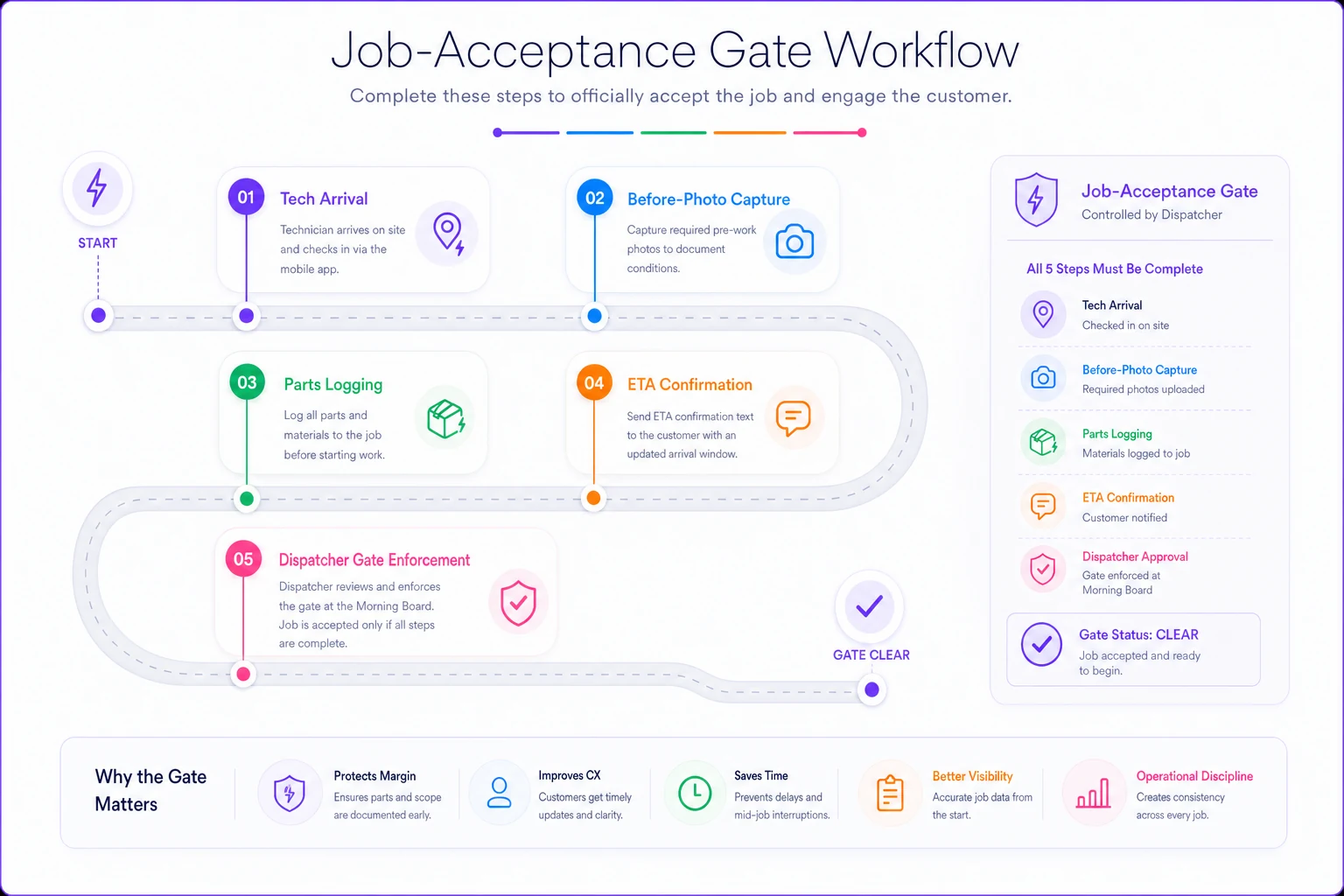
What makes this gate stick is that the dispatcher enforces it, not the tech on himself. During the morning board review, the dispatcher glances at which jobs have hit "In Progress" without an acceptance record. That's the whole mechanism — a 90-second scan, not a 40-page policy.
Wave 1, Template D — Job-completion QA checklist
The callback that arrives three weeks later costs you the return trip, the materials, the customer's trust, and usually the review. Completion QA is the cheapest insurance in the trades.
Owner role: Field supervisor Enforcement gate: Invoice cannot be released until completion checklist + after-photos are attached. Acceptance criteria: QA completion ≥90% within 90 days; callback rate trending down quarter over quarter.
Completion QA checklist (copy/paste):
-
After-photos
panel closed, cover on, work area cleaned
-
Torque check on terminations completed
-
Circuit labeled / directory updated
-
Customer walkthrough done + verbal sign-off
-
Parts used matches parts logged at acceptance
-
Payment collected or terms confirmed
Tying QA to invoice release is the trick. Techs are motivated to get paid — if the invoice won't fire without the checklist, the checklist gets done. Separate the two and the QA step quietly disappears inside a month.
Wave 2 — Coordination layer
Once Wave 1 is holding above 80% adoption, layer in the coordination templates. These matter more as volume climbs, because that's when handoffs between office and field start dropping information.
Dispatcher call & confirmation scripts
Owner role: Dispatch lead Enforcement gate: Confirmation call/text logged the evening before or morning of each job. Acceptance criteria: ≥90% of next-day jobs confirmed; no-show/locked-out rate down.
> "Hi [name], confirming your electrician for tomorrow between [window]. Tech will text when en route. Quick check — is the panel accessible, and is there parking? Anything changed since you called? Great, see you then."
That "anything changed" question catches the customer who fixed it themselves, moved, or added scope — before you waste a truck roll.
Photo / parts / asset logging templates (mobile FSM)
Naming convention (copy/paste standard):
[JobID][Stage][Component] → e.g. 4471BEFOREPANEL, 4471AFTERPANEL, 4471PARTSBREAKER20A
Owner role: Field supervisor Enforcement gate: Photos auto-tagged to job in FSM; monthly spot audit of 10 random jobs. Acceptance criteria: ≥95% of photos correctly tagged within 180 days.
Escalation routing template
Owner role: Field supervisor (after-hours: on-call lead) Enforcement gate: Any red-flag condition triggers a logged escalation, not a judgment call.
-
Red-flag triggers scope exceeds quote by >25%, any live-panel hazard, customer dispute, permit/inspection complication, safety incident. Tech calls the escalation line, outcome logged in the job.
Any red-flag condition triggers a logged escalation, not a judgment call.
Wave 3 — Safety incidents & the pilot playbook
Safety incident template
Owner role: Owner / safety lead Enforcement gate: Any incident (near-miss included) documented within 24 hours. Acceptance criteria: 100% of incidents logged; near-misses captured, not just injuries.
Incident record (copy/paste):
-
Date/time/location + job ID
-
What happened (factual, no blame)
-
Injury? / Property damage? / Near-miss?
-
Immediate action taken
-
Root cause
-
Corrective action + owner + due date
Shops with the fewest serious incidents are the ones logging the near-misses — the ones where nothing actually got hurt. That log is where your next real SOP comes from.
The pilot playbook — how to roll out each SOP without the crew rejecting it
This is the part almost nobody does, and it's why SOPs get quietly ignored in week one. You don't deploy a new SOP to all 20 techs at once. You pilot it.
Numbered pilot process:
-
Pick a small sample. 2–3 techs — ideally one skeptic and one early adopter. Not just your best guy, because he'll make any SOP look like it works.
-
Set a control. Keep the rest of the crew on the old way for 2–3 weeks so you have an actual comparison, not a gut feeling.
-
Run 2–3 weeks. Short enough to stay honest, long enough to get past the awkward first days.
-
Weekly review. 15 minutes
what broke, what felt dumb, what the numbers say.
-
Decide
adopt, adjust, or kill.
If adoption in the pilot group can't clear around 80%, the SOP is too heavy — simplify before you scale it.
Weekly pilot review checklist:
-
Adoption rate in pilot group this week
___%
-
Friction points raised by techs
-
Any customer-facing impact (good or bad)
-
Metric vs. control group
-
Keep / tweak / stop?
Escalation triggers during a pilot: adoption stalls below 60% after week two → stop and redesign. Any safety concern → stop immediately. Customer complaint tied to the new step → pause and review.
A real rollout scenario
A residential shop running 6 techs, scaling toward 12, was dealing with roughly 8–10 callbacks a month — most traced back to missing before-photos and parts pulled off the van that never got logged, so invoices came up short or got disputed.
They rolled out Wave 1 only. Acceptance gate enforced by the dispatcher at the morning board, completion QA tied to invoice release. Piloted on 3 techs for three weeks before going shop-wide.
By the end of the first 90 days: acceptance-gate adoption was sitting around 88%, callbacks dropped to 3–4 a month, and the parts reconciliation at month-end — which used to eat the office manager's entire Friday — shrank to under an hour. Nothing dramatic happened overnight. The improvement showed up as fewer fires, a cleaner close, and invoices that stopped getting argued over.
The reason it worked wasn't the documents. It was that each SOP had a gate someone actually watched.
When this pack makes sense — and when it doesn't
When it makes sense: You're between 4 and 20 techs, coordination is getting sloppy, and you've got at least one person who can own enforcement — a dispatch lead or field supervisor. That's the range where SOPs go from "nice to have" to "the thing keeping you from drowning."
When it's a bad idea: You're still running 2 techs and you're the dispatcher, the estimator, and tech #1. At that size, enforcement gates have no owner but you, and you'll resent them. Nail your intake and completion QA first — skip the rest until you've got a second office person.
Who should not roll all of this out at once: Anyone who hasn't piloted anything before. If your crew has been burned by a binder that showed up and died, deploy one template, prove it with numbers, then earn the right to add the next one. Trust in the system is a resource you spend, and you don't have much of it early.
The whole point of attaching an owner, a gate, and an acceptance number to every template is that it makes the SOP measurable instead of aspirational. You'll know within 90 days whether a rule is holding, and you'll kill the ones that aren't instead of pretending the binder is working. That's what lets a 6-tech shop grow into a 20-tech shop without the owner's head being the only place the operation actually lives.
The whole point of attaching an owner, a gate, and an acceptance number to every template is that it makes the SOP measurable instead of aspirational. You'll know within 90 days whether a rule is holding, and you'll kill the ones that aren't instead of pretending the binder is working. That's what lets a 6-tech shop grow into a 20-tech shop without the owner's head being the only place the operation actually lives.
Ready to optimize your electrical service operations?
Join 500+ electrical service companies using Voltzly to improve scheduling accuracy, enhance client satisfaction, and boost operational efficiency.