

Three years after completing a commercial panel upgrade, an electrical contractor got hit with a lawsuit claiming improper grounding caused equipment damage. The contractor knew the work was done right. The inspector had signed off. But when their lawyer asked for job documentation, all they had was a blurry photo of the completed panel and an invoice. No before photos. No documentation of existing conditions. No record of the customer acknowledging visible damage that was already there before anyone touched it. They settled for well over what the job originally paid — plus legal fees.
Why defensible documentation matters before a dispute ever starts
This happens more than most people realize. Not because electricians do bad work, but because field data governance simply doesn't exist in most shops. Techs take photos when they remember, name files however they feel like, and everything gets dumped into random folders or stays on personal phones. When you need a specific photo from 18 months ago to defend a warranty claim, good luck finding it.
The problem compounds as shops grow. What works when you're running three jobs a week falls apart at thirty. Suddenly you're managing documentation from multiple crews, dealing with insurance audits, handling warranty disputes, and trying to prove code compliance for work done by techs who left six months ago. Without proper documentation practices, every completed job is a quiet liability sitting in the background.
Why electrical shops operate without documentation standards
Most electrical contractors start the same way. You're good at the technical work, you build a reputation, jobs start flowing. Documentation feels like bureaucracy that slows you down. You know what you did, the customer's happy, the check clears.
Never miss a job or delay a dispatch again.
Voltzly helps you schedule, assign, and track every electrical job efficiently.
- Unified job scheduling
- Real-time technician tracking
- Automated client notifications
No credit card required
Then reality hits. A customer claims you damaged their hardwood floors during a panel upgrade. Your insurance company wants proof of pre-existing conditions. An inspector fails a job your lead tech completed last year and you need to prove what was actually installed. The building owner's new contractor says your work caused their problem. Each situation demands documentation you don't have.
The breakdown usually happens gradually. Techs develop their own habits — one guy photographs everything, another takes none. File names range from "IMG_4782" to "panel" to "Johnson job Tuesday." Photos sit on personal phones until storage runs out. Important details live in text threads. When someone needs specific records, it triggers a treasure hunt across devices, cloud accounts, and group chats.
Even shops that try to implement standards struggle with actual adoption. You create a photo checklist, but techs skip it when they're rushing to the next job. You set up a shared drive, but files still get saved locally. You mandate naming conventions, but everyone interprets them differently. The system exists on paper and falls apart in the field.
The financial exposure grows with every undocumented job. A single disputed insurance claim can easily run into tens of thousands of dollars in settlement and legal costs. Failed inspections requiring rework aren't cheap either. Warranty disputes you can't defend eat real margin. Poor documentation is essentially a hidden tax on growth.
The cascade of problems from poor photo documentation
When documentation fails, it tends to fail everywhere at once. A tech finishes rewiring a kitchen, takes a few random photos, moves on. Six months later, the homeowner claims the electrical work caused water damage to their cabinets. Your tech swears the damage was pre-existing, but without before photos there's nothing concrete to back that up.
The dispute escalates. The homeowner files an insurance claim. Their insurance company demands your documentation. You scramble to find anything — the original estimate, text messages, inspection reports. The tech who did the work left three months ago and deleted his photos to free up phone space. Your insurance company treats the missing documentation as negligence.
Meanwhile, similar problems surface on other jobs. A commercial customer disputes the scope of completed work. Another wants warranty service on something that wasn't part of the original job. Each situation requires hours of digging through incomplete records, calling former employees, and trying to piece together what actually happened.
The operational impact spreads beyond disputes. Techs waste time recreating documentation for permits and inspections. Estimators can't reference previous similar jobs because records are scattered. Training new techs gets harder without documented examples. Quality control starts relying on memory instead of evidence.
Most of those situations could be resolved quickly with solid photo documentation and proper file management. But once you're in the middle of a dispute without that documentation, you've already lost your footing.
Building a defensible photo pack system by job type
Real field data governance starts with defining exactly what photos each job type requires. Not suggestions, not nice-to-haves — mandatory photo packs that must be complete before a job gets marked finished.
For residential service calls, the minimum pack includes: main panel before and after, work area before starting, any existing damage or code violations, completed work from multiple angles, and a customer signature on the completion form. Every photo should show date stamps and relevant details.
Panel upgrades need more extensive documentation: existing panel from three angles, main disconnect status, all branch circuit labeling, grounding system condition, wall condition behind the panel, new panel rough-in, inspection approval, and final installation with cover open and closed. Include photos of the permit, inspector's notes, and any additional work discovered during the upgrade.
Commercial installations need comprehensive coverage: site conditions before work begins, existing electrical infrastructure, all connection points, conduit runs, junction box interiors, equipment nameplates, testing results on meters, as-built drawings, and relevant sign-offs.
Here's how a standard photo pack matrix works:
| Job Type | Mandatory Photos | Timing | Storage Duration |
|---|---|---|---|
| Service Call | 5–8 images | Before/after | 2 years |
| Panel Upgrade | 15–20 images | Staged throughout | 7 years |
| New Construction | 30–50 images | Phase-based | 10 years |
| Commercial Retrofit | 25–35 images | Daily progress | 7 years |
| EV Charger Install | 12–15 images | Before/during/after | 5 years |
The enforcement mechanism matters as much as the requirements themselves. Jobs can't be invoiced until photo packs are complete. Techs can't move to their next job without uploading required photos. Making documentation mandatory — not optional — changes behavior fast.
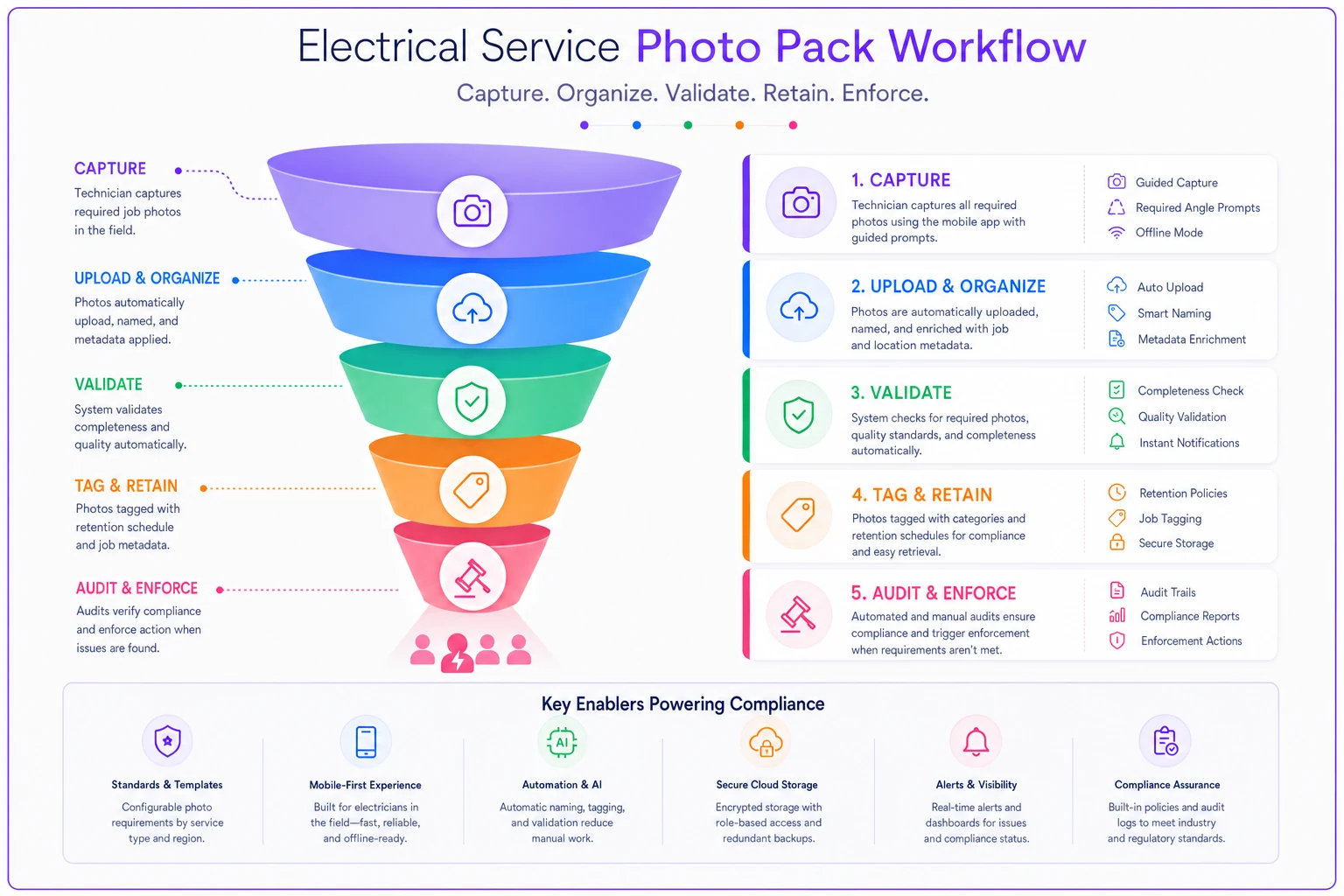
A quick visual of the photo-pack workflow.
The table above isn't a suggestion for what's ideal. It reflects minimums that actually hold up when documentation gets scrutinized under pressure.
Creating naming conventions that survive employee turnover
File naming seems trivial until you're searching through thousands of photos for evidence in a legal dispute. A naming convention that makes sense to one person becomes useless when they leave. The system needs to work regardless of who's searching or when.
A functional naming structure includes: date (YYYYMMDD format for sorting), job number, location identifier, and photo type. Something like "20240315J4782MainPanelBefore" tells you exactly what you're looking at without opening the file. Adding the customer's last name helps — "20240315J4782SmithMainPanel_Before" covers everything you'd need at a glance.
Use YYYYMMDD in filenames to ensure consistent sorting and easier searching.
Location identifiers prevent confusion on multi-unit or commercial jobs. "Unit2Bedroom1OutletNorth" is infinitely more useful than "outlet photo." For commercial sites, include floor and room numbers: "Floor3Room312Panel2ABefore."
The metadata layer adds more context. Modern phones embed GPS coordinates, timestamps, and device information automatically. But manual metadata matters too — tech name, permit number, inspection status, warranty terms. This information should be embedded in file properties, not just the filename.
Consistency requires some enforcement. New techs get a laminated card with naming examples. Monthly audits flag non-compliant files for correction. The person doing the naming changes, but the system shouldn't.
Retention schedules that balance liability and storage costs
Keeping everything forever sounds safe but becomes operationally unmanageable. A five-tech shop can generate thousands of photos monthly. After a couple of years, you're managing massive file volumes across devices and accounts. Storage costs multiply, search becomes a nightmare, and backup systems start breaking down.
Retention schedules need to match actual legal and operational requirements. Warranty work needs documentation for the warranty period plus at least a year. Insurance claims can surface years post-completion depending on your state. Commercial work often involves longer warranty windows. Code violation disputes can pop up during property sales years after the work was done.
A practical retention framework:
-
Permanent retention (no deletion) - Incident reports with injury or property damage - Failed inspection documentation - Legal dispute materials - Major commercial projects over a certain contract threshold
-
7-year retention - Panel upgrades and service changes - Commercial installations - Whole-house rewiring - Insurance claim documentation
-
3-year retention - Standard residential service calls - Minor repairs - Warranty work documentation - Estimate photos for uncompleted jobs
-
1-year retention - Quote follow-up photos - Training documentation - Internal quality checks - Temporary power setups
The key is automatic enforcement. Files get tagged with retention dates at upload. Quarterly processes archive older files to cheaper cold storage. Annual reviews permanently delete expired files. Manual deletion should require manager approval with documented reasoning.
Shops that skip retention policies end up in one of two places: they delete things too aggressively and lose documentation they needed, or they never delete anything and eventually can't find what matters.
The audit checklist that proves defensibility
Having documentation means nothing if you can't produce it quickly during an audit or legal discovery. The audit checklist is what transforms scattered files into defensible evidence.
Start with job identification: can you locate all documentation for a specific job within five minutes? That includes photos, permits, inspection reports, customer communications, and change orders. If finding job records requires calling multiple people or digging through personal devices, the system has already failed.
-
All mandatory photos present per job type
-
Proper naming conventions followed
-
Metadata intact and unmodified
-
Retention schedule compliance
-
Backup verification completed
-
Access logs showing no unauthorized changes
-
Customer acknowledgment captured
-
Inspector approvals documented
Run this audit monthly on random samples, quarterly on all active jobs, and annually on archived materials. Document the audit results themselves — proving you have a system and actually follow it matters as much as the documentation itself.
Converting photo chaos into operational intelligence
Beyond legal protection, proper field documentation becomes a genuine operational asset. Those thousands of photos contain patterns about job complexity, common problems, and training opportunities that you'd otherwise never see.
When every panel upgrade is documented the same way, trends start emerging. Maybe a large portion of older homes in your area have aluminum wiring nobody mentioned upfront. Certain neighborhoods consistently have code violations that throw off quote accuracy. These patterns only surface from consistent documentation — not from memory or gut feel.
Photo documentation also speeds up estimation. When an estimator can review similar past jobs with complete photo sets, quotes get more accurate. They see what problems emerged, what additional work was actually needed, how long things took versus the original estimate.
Training accelerates too. New techs can review photo sequences from experienced techs. Mistakes become teaching moments when you can show exactly what went wrong. Best practices spread faster when everyone can see what good work looks like, not just hear about it in a meeting.
Quality control shifts from random spot checks to systematic review. Managers scan photo packs for compliance issues, safety violations, or incomplete work. Problems get caught before customers notice. Callbacks drop when someone reviews every job's documentation before marking it complete.
Making documentation seamless with operational software
The gap between theory and practice in field data governance comes down to friction. Every extra step between taking a photo and having it properly filed reduces compliance. When techs need to remember to take photos, transfer them later, rename them manually, and upload to the right folder — the system breaks down. That's just reality.
Modern AI-powered operational platforms solve this by embedding documentation directly into the job flow. Photos captured through the platform automatically inherit job numbers, customer names, and location data. The system prompts for required photos based on job type. Files upload with proper naming conventions already applied. The tech doesn't have to think about it.
The integration carries through to job completion. Jobs can't be marked complete without required photos. Invoices won't generate until documentation passes basic audit checks. This removes the human discipline element from the equation — the platform enforces governance rules so individual techs don't have to remember.
AI-assisted features inside these platforms can improve documentation quality without adding work. The system flags blurry photos and requests retakes. It identifies missing details like permit numbers or serial numbers. None of this requires extra effort from the tech on-site — it just happens in the background.
The retention and audit components become automatic too. Files are tagged with appropriate retention dates at creation. Scheduled processes handle archival and deletion. Audit reports generate without anyone compiling them manually. Legal discovery requests that used to take weeks can be fulfilled in hours.
More importantly, the documented data becomes searchable and actually useful. Instead of thousands of isolated images, you have a searchable database of job records — every panel upgrade in a specific neighborhood, all installations of a particular equipment model, before/after comparisons across similar job types. The documentation stops being just a defensive requirement and starts being something the business actually uses day to day.
Starting field data governance without disrupting operations
The path to proper documentation doesn't require shutting down operations for a massive overhaul. Start with one job type — typically panel upgrades, since they carry the most liability exposure. Define the photo pack, naming convention, and retention rules for just that category.
Roll it out to one crew first. Let them work through the friction points and suggest improvements. Their feedback shapes the system before it spreads to other crews. When they start seeing real benefits — faster permit approvals, fewer callbacks, disputes that actually get resolved — they become advocates rather than resistors.
Add job types gradually. Service calls might be next, then new construction. Each category gets its own requirements based on actual liability exposure and operational needs. The system grows organically rather than being imposed all at once.
The technology stack can start simple. A shared drive with a consistent folder structure beats random photo storage. Add naming convention enforcement through training first. Use spreadsheets for audit tracking initially. Upgrade to specialized software once the process is proven and the team is bought in.
Success depends on making documentation easier than non-compliance. If taking proper photos and filing them correctly is the path of least resistance, techs will follow it. That might mean simplifying other parts of their workflow to make room for documentation time.
A realistic rollout timeline:
-
Month 1 — Define requirements for highest-risk job type
-
Month 2 — Pilot with one crew, refine based on feedback
-
Month 3 — Roll out to all crews for that job type
-
Months 4–6 — Add remaining job types gradually
-
Month 6+ — Full implementation with automated enforcement
Measure success through reduced dispute resolution time, lower insurance premiums, fewer failed inspections, and faster payment collection. Those metrics justify the investment and motivate continued compliance better than any top-down mandate.
Where this all leads
Field data governance isn't about creating bureaucracy. It's about protecting the business you've built. Every undocumented job is a potential liability that could surface years later. Every missing photo is evidence you can't use to defend your work. Every improperly named file is time wasted searching during a critical moment.
The operational cost of poor documentation compounds quietly. Disputes take longer to resolve. Insurance premiums creep up after claims you couldn't defend. Good techs leave when they're blamed for problems they didn't cause but can't disprove. Growth stalls because you're constantly dealing with fires from past jobs instead of focusing forward.
Done right, documentation creates value you don't expect going in. Those photos become training materials, quality control tools, and estimating data. Consistent documentation makes jobs more profitable through better quotes and fewer surprises. The business becomes more defensible — and frankly more valuable — because it can actually prove its work quality.
The system doesn't need to be perfect from day one. Start with the highest-risk job types. Focus on the photos that matter most for liability protection. Build habits gradually. Let the benefits prove the value rather than mandating participation from the top.
Most importantly, recognize that documentation standards are really about whether you can actually scale. What works when you personally complete every job breaks down with multiple crews. The habits you build today determine whether you can grow to ten, twenty, or fifty techs without drowning in operational chaos — and whether you can eventually step back from the field and run the business instead of just working in it.
Ready to optimize your electrical service operations?
Join 500+ electrical service companies using Voltzly to improve scheduling accuracy, enhance client satisfaction, and boost operational efficiency.