


You finish wiring that kitchen remodel on Tuesday. The homeowner's thrilled, everything tests perfect, but you don't get around to sending the invoice until the following Monday. By then, they've mentally moved on. The check that should've been cut immediately now sits in their "deal with later" pile. Three weeks pass before you finally get paid on a job you completed perfectly.
This pattern destroys cash flow for electrical contractors, and it happens constantly. Not because of bad customers or payment disputes—because the job closure process drags out over days or weeks instead of hours.
The gap between job completion and invoice generation kills profitability in ways most contractors don't fully account for. You're essentially extending interest-free credit to every customer. And the longer that gap stretches, the harder collections get. Customers question charges they don't remember. They dispute work they can't picture. A simple transaction turns into a negotiation.
Why electrical contractors struggle with 48-hour job closures
The typical residential electrical job has too many loose ends. You've got the actual electrical work, obviously. But then there's the permit sign-off, the homeowner walkthrough, the cleanup photos, the material reconciliation, the warranty paperwork. Each piece lives somewhere different—some in your tech's head, some in text messages, some on paper forms stuffed in the van.
Your tech finishes the panel upgrade at 3 PM. They snap a few photos on their phone. The permit card gets signed and left with the customer. Notes about extra materials used? Scribbled on the work order. The customer's verbal approval? Just that—verbal. By the time all these pieces make it back to the office for invoicing, it's been four days and details are already slipping.
The problem compounds when you're running multiple jobs. One tech forgets to submit photos. Another loses the signed permit. A third doesn't note the additional outlet the customer requested mid-job. Your office manager spends hours chasing information, and even then, invoices go out incomplete or incorrect.
What really breaks the process is the lack of standardization. Every tech handles job closure differently. Some are meticulous. Others figure if the lights work and the customer seems happy, the job's done. That inconsistency means you never know if you have everything needed to invoice until you actually try to create one.
Building your 24-48 hour job finalization checklist
A proper job finalization checklist needs to capture everything required for immediate invoicing while the job is still fresh. This isn't about creating more paperwork—it's about getting the right information from the field to the invoice without delays or gaps.
Never miss a job or delay a dispatch again.
Voltzly helps you schedule, assign, and track every electrical job efficiently.
- Unified job scheduling
- Real-time technician tracking
- Automated client notifications
No credit card required
Core documentation requirements
Start with the non-negotiables. Every completed job needs:
-
Signed completion form — Not a generic signature, but a specific acknowledgment listing what was installed, tested, and verified working. Include fields for: - Main panel modifications (breakers added/moved) - Circuits installed or modified - Outlets/switches/fixtures installed - Testing completed (GFCI, AFCI, voltage checks) - Customer-requested changes from original scope
-
Permit documentation — This varies by jurisdiction, but typically includes: - Photo of signed permit card - Inspector sign-off (if required) - Certificate of compliance - Any inspection corrections addressed
-
Visual proof of completion — Photos that actually matter for invoicing: - Wide shot of completed work area - Close-ups of new installations - Panel with cover off showing new breakers - Any custom work or unusual configurations - Before/after if significant changes were made
The templated acceptance form that prevents disputes
Generic sign-off sheets create problems. "Work completed satisfactorily" means nothing when a customer claims three weeks later that you were supposed to install a dimmer instead of a regular switch.
Your acceptance form should force specificity:
ELECTRICAL SERVICE COMPLETION VERIFICATION Job Address: Date: ___ Work Performed: ☐ Panel upgrade from amp to amp ☐ New circuits installed: Quantity: Locations: _ ☐ Outlets installed: Standard: GFCI: USB: 240V: ☐ Switches installed: Standard: Dimmer: Smart: _ ☐ Fixtures installed/replaced: Quantity: Type: _ ☐ EV charger: Level: Amperage: Location: ☐ Other: _ Testing Completed: ☐ All circuits tested and operational ☐ GFCI/AFCI protection verified ☐ Voltage readings within spec ☐ Grounding verified Materials Outside Original Estimate: _ _ Customer Acknowledgment: All work listed above has been completed and tested. I have been shown the main electrical panel changes. I understand the warranty terms (attached). Signature: Date: _
That level of detail eliminates the "I thought you were going to..." conversations that slow down payment.
Photo requirements that support fast invoicing
Random job photos don't help with invoicing. You need a photo protocol that proves work completion and justifies charges.
-
Pre-work documentation (if not already captured during estimate) - Main panel before modifications - Work areas before installation - Any existing damage or issues
-
Progress markers - Rough-in before drywall (for new construction) - Panel with new breakers before cover - Wire runs in attic/crawlspace
-
Completion proof - All new devices installed and labeled - Panel with new breaker labels - Permit card with signatures - Clean work area - Any surfaces repaired/patched
-
Special circumstances - Unusual mounting situations - Code corrections made - Additional work requested by customer - Materials that exceeded estimate
Each photo should be tagged with location and context. "Kitchen GFCI outlet installed per code requirement" carries more weight than "outlet pic 3."
Job Finalization Workflow: Field to Invoice
[Job Complete on Site] | v [Tech Completes Digital Acceptance Form with Customer] | v [Photos Uploaded and Tagged by Category] | v [Permit Documentation Captured] | v [24-Hour Documentation Check - Office Review] | / \ [Complete] [Missing Items - Tech Notified Same Day] | v [Invoice Generated Within 48 Hours] | v [Courtesy Call/Text Sent to Customer] | v [Collection Trigger Sequence Begins]
Use this visual to keep everyone aligned on who does what and when.
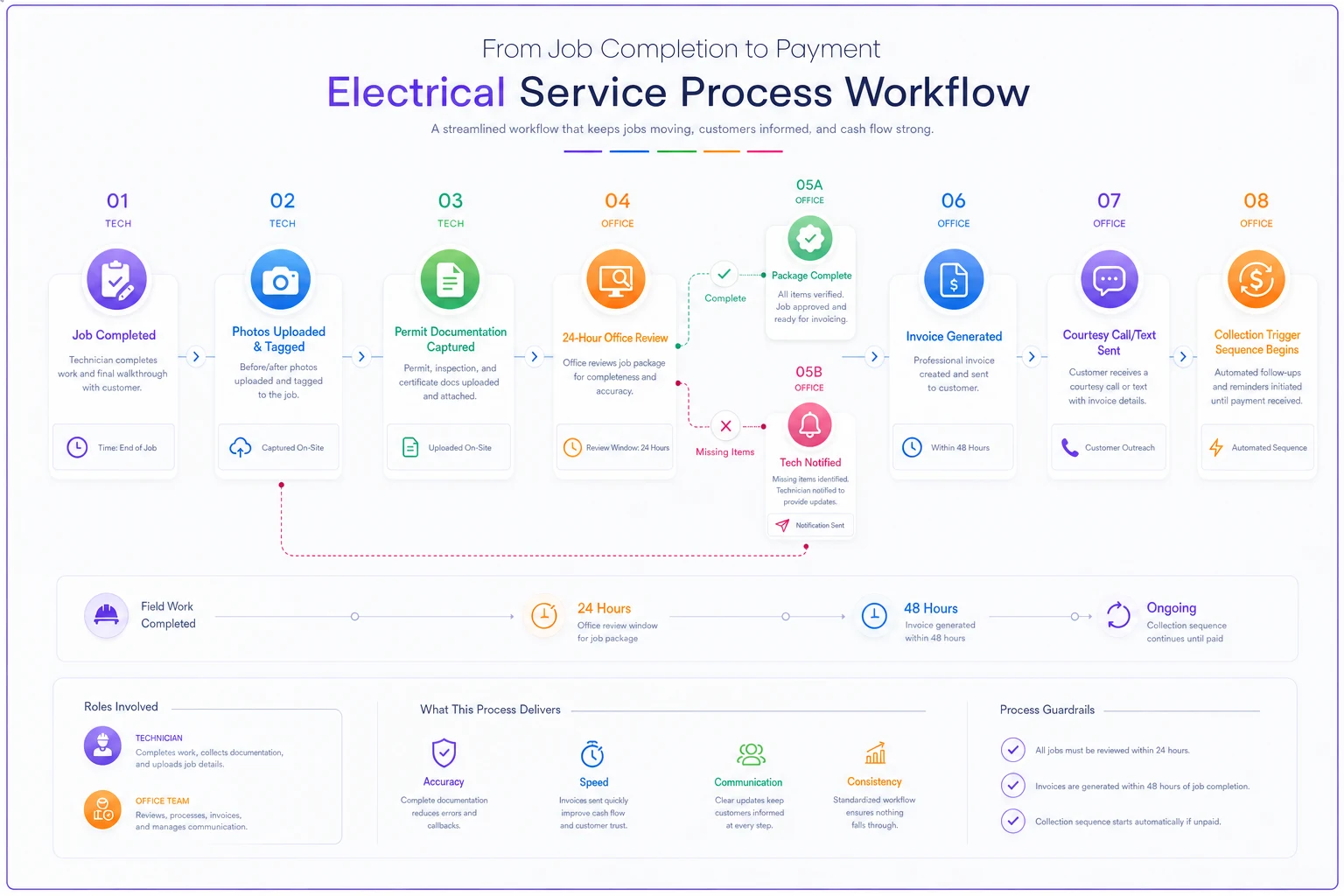
This flow is the operational backbone—follow it to ensure documentation moves quickly from the field to billing.
Collection triggers that activate at 24 and 48 hours
The difference between collecting in 5 days versus 25 days often comes down to when you first attempt collection. Waiting for the customer to pay on their own timeline puts you at the mercy of their priorities—not yours.
The 24-hour checkpoint
Within 24 hours of job completion, your system should verify:
-
All documentation received from field
-
Photos uploaded and tagged
-
Acceptance form signed and uploaded
-
Permit documentation complete
-
Any missing items flagged for immediate follow-up
If anything's missing, the tech gets a reminder while the job is still fresh. "Missing: permit photo for Johnson job completed yesterday." This prevents the scramble to recreate documentation weeks later when nobody remembers exactly what happened.
The 48-hour invoice trigger
At the 48-hour mark, assuming all documentation is complete, the invoice should go out with:
-
Detailed line items from the acceptance form
-
Link to photo documentation
-
Digital copy of signed acceptance
-
Payment options (ACH, credit card, check)
-
Clear payment terms (Net 15, 2% discount if paid within 5 days, etc.)
Most contractors skip this next part—the invoice should also trigger a courtesy call or text: "Hi, this is [Company]. Just confirming you received the invoice for the electrical work we completed on [date]. The new kitchen circuits and GFCI outlets are all covered under our standard warranty. Let me know if you have any questions."
This one touchpoint confirms receipt while the work is still fresh, prevents the invoice from getting buried in email, opens dialogue before questions turn into disputes, and creates some urgency around payment.
Escalation patterns that preserve relationships
-
Day 5 after invoice
Friendly reminder text/email "Just a heads up that your invoice for $1,847 is due in 10 days. You can pay online at [link] or let me know if you need to arrange something different."
-
Day 12
Personal call from the office "Hi, this is Sarah from [Company]. Wanted to make sure everything's working great with the electrical work we did last week. Also checking if you had any questions about the invoice?"
-
Day 16
Formal reminder with late fee warning "Your invoice is now past due. Per our terms, a 1.5% monthly late fee will be added after day 20. Please remit payment immediately to avoid additional charges."
-
Day 25
Collection procedure notice "This account will be forwarded to our collections process in 5 days. Please contact us immediately to avoid additional fees and potential credit reporting."
Consistency matters here. When customers learn you follow up promptly and professionally, they prioritize your invoices over contractors who let things slide.
Operational adjustments for consistent 48-hour closure
Getting to consistent 48-hour job closure means rethinking how your techs end their day and how your office processes job documentation.
End-of-day tech requirements
-
Complete digital acceptance form with customer
-
Upload all required photos with tags
-
Note any variations from original estimate
-
Submit time and materials for the job
-
Flag any warranty items or follow-ups needed
This takes maybe 10 minutes on-site but saves hours of back-and-forth later. The customer's right there to answer questions. The work is visible for photos. Details are fresh.
Office-side processing changes
-
Morning
Review all jobs completed the previous day
-
Flag missing documentation immediately
-
Generate invoices for complete jobs Trigger collection calls for appropriate accounts
This sounds like more work, but it's actually less. You're dealing with two or three jobs at a time instead of twenty or thirty at week's end. Problems get caught immediately instead of discovered during invoicing.
The tech accountability component
Some techs will resist additional documentation requirements. They see it as paperwork that slows them down. That pushback is normal—but it's manageable.
First, track the data. Show them that jobs with complete documentation get paid roughly 18 days faster on average. That's real money flowing faster through the business.
Second, tie it to compensation. Jobs aren't "complete" for commission purposes until documentation is submitted. Watch how quickly photo uploads improve.
Third, provide the right tools. If techs are using personal phones for photos, cover part of their bill. If they need tablets for digital forms, invest in them. Faster collections pay for the hardware within a month or two.
Common failure points in rapid job closure
Even with solid processes, certain situations consistently break the 48-hour target. Knowing them helps you build workarounds before they become problems.
Multi-day jobs and progress billing
A kitchen remodel that runs four days can't wait until the final day for all documentation. Break it into phases:
| Phase | Work Milestone | Documentation Required | Invoice Portion |
|---|---|---|---|
| Day 1 | Rough-in complete | Photos + progress sign-off | 30% |
| Day 2–3 | Installation phase | Daily photos | 40% |
| Day 4 | Finish + testing | Full acceptance form + permit docs | 30% |
Each phase gets its own acceptance signature. Cash keeps flowing and you avoid the large invoice that makes customers hesitate.
Warranty work and callbacks
When you're back to fix something, documentation often gets skipped. "It's warranty, no invoice needed." Still the wrong approach. You need:
-
Documentation of what was fixed
-
Customer acknowledgment that the issue is resolved
-
Photos of the resolution Update to the original job file
This protects you if problems persist and prevents customers from claiming endless warranty issues on work that was fine to begin with.
Change orders during jobs
The customer adds an outlet while you're there. It seems minor, so the tech does it without paperwork. Three weeks later, you're arguing about whether it was included in the original price.
Fix this with a simple template change order form on the tech's phone:
CHANGE ORDER - Must be signed before work proceeds Original scope: [pre-filled from work order] Addition requested: Additional cost: $ Additional time: Customer signature: _
Takes about 90 seconds. Prevents hours of disputes.
Permit delays and provisional closure
Sometimes permits take weeks for final inspection. You can't wait that long to invoice. A provisional closure process handles this cleanly:
-
Complete all work and testing
-
Get customer acceptance for work performed
-
Invoice with notation about pending permit
-
Hold 10% retention until permit finalized
-
Send final invoice upon permit approval
This keeps cash flowing while protecting both parties.
Training your team for consistent execution
A job finalization checklist only works if everyone follows it consistently. That requires more than sending an email saying "here's the new process."
The rollout sequence
Week 1: Start with your best tech. They become the internal champion who can honestly tell others "this actually makes things easier."
Weeks 2–3: Add your next two or three most reliable techs. Work out the kinks with people who'll give useful feedback.
Week 4: Full team rollout with the early adopters helping train.
This staged approach prevents wholesale rejection and creates internal advocates before anyone can claim the process doesn't work.
Daily reinforcement strategies
-
Morning dispatch
"Remember, jobs aren't complete without photos and signatures."
-
End-of-day check-ins
"Did everyone submit documentation? Any issues with the forms?"
-
Weekly metrics
"Average time to payment last week: 11 days. Previous average: 23 days."
When techs see the actual impact on cash flow, compliance improves fast.
Handling the resistant tech
Track their jobs separately. Show the payment delay on their work versus techs who follow the process. Let peer pressure do the work when others are hitting commission faster. If they still push back, make it a performance issue, not a preference issue. Most come around.
Technology integration without overwhelming the team
The job finalization checklist works on paper, but it works much better with the right setup. This doesn't mean expensive enterprise software—it means smart use of tools your team probably already has.
Mobile-first documentation
-
Photo apps with tagging
Apps that let techs label photos immediately—"Panel before," "Panel after," "GFCI kitchen install."
-
Digital forms
Google Forms, JotForm, or similar for acceptance signatures. Customer signs on the phone, PDF generates automatically.
-
Voice notes
For complex situations, let techs record a quick voice note explaining unusual circumstances. Faster than typing, more detailed than written notes.
Automated reminder systems
-
Calendar reminders
Job completed Monday = invoice reminder Wednesday.
-
Email sequences
Automated follow-ups based on invoice age.
-
Text messaging
SMS reminders often outperform emails for prompt payment.
You don't need anything sophisticated—basic if-then automation handles the majority of collection triggers.
The bridge to full operational software
Manual checklists and basic automation get you started, but as you scale, the gaps become obvious. You're still juggling multiple systems, entering data twice, and manually tracking triggers.
That's where AI-powered operational software becomes genuinely useful—not as a magic fix, but as a way to connect all the pieces. Modern platforms can automatically compile photos, forms, and field notes into complete job records, generate invoices immediately when documentation is complete, and trigger collection sequences without anyone having to remember. They also surface patterns you'd never catch manually: which techs consistently miss documentation, which customer types pay late, where the friction actually is.
The software doesn't replace your process. It amplifies it. The job finalization checklist you build manually becomes the foundation for an automated system that scales without adding headcount.
Measuring success: KPIs that matter
You can't improve what you don't measure. Track these to know whether your job finalization checklist is actually working:
Time-based metrics
| Metric | Description | Target |
|---|---|---|
| Documentation turnaround | Hours between job completion and full documentation submitted | Under 4 hours |
| Invoice generation time | Hours between documentation complete and invoice sent | Under 24 hours |
| Average days to payment | Days from job completion to payment received | Under 15 days |
| First attempt payment rate | % of invoices paid without follow-up | Above 70% |
Quality metrics
| Metric | Description | Target |
|---|---|---|
| Documentation completeness score | % of jobs with all required elements on first submission | Above 90% |
| Invoice accuracy rate | % of invoices without customer disputes or corrections | Above 95% |
| Collection escalation rate | % of invoices requiring formal collection procedures | Below 5% |
These aren't vanity metrics—they connect directly to cash flow. A 10-day improvement in average payment time on $40,000 monthly billing means roughly $13,000 less in working capital tied up at any given moment.
For more on which metrics actually drive business decisions, check out our breakdown of KPI dashboards for electrical contractors.
Special considerations for different job types
Not every electrical job fits the same closure pattern. Your checklist needs variations while maintaining the core 48-hour target.
Service calls versus installation jobs
A two-hour service call to replace a bad breaker has different documentation needs than a full kitchen rewire:
-
Service call modification
- Single photo of the repair - Brief description of problem found and fix applied - Customer verbal approval noted - Immediate payment preferred (tech carries card reader)
-
Installation job requirements
- Full photo set (before, during, after) - Detailed acceptance form - Permit documentation - Standard payment terms
Have both templates ready so techs don't overthink which one applies.
Emergency versus scheduled work
Emergency calls—especially after-hours responses—often skip documentation in the rush to restore power. Build a specific emergency closure process:
-
Immediate
Make it safe, restore power
-
Before leaving
Quick photo, customer signature on phone
-
Next business day
Full documentation, detailed invoice
-
48-hour follow-up
Confirm the customer understands charges, offer scheduled repair if the emergency was a temporary fix
Commercial versus residential variations
Commercial customers often have their own documentation requirements that can slow your process. Get ahead of this by requesting their required forms during scheduling, pre-filling whatever you can before the job, and including their PO numbers on all documentation. Submit to the right contact—not always the person you worked with—and understand their billing cycle if payment terms allow any flexibility.
The compounding effect of consistent execution
Here's what actually happens when you nail the 48-hour job closure consistently for 90 days.
Your cash position improves almost immediately. Instead of floating 30–45 days of receivables, you're down to 15–20. That's thousands of dollars available for materials, payroll, or growth—instead of sitting in someone else's account.
Customer relationships improve too. It seems counterintuitive—wouldn't faster invoicing feel pushy? In practice, no. When the work is fresh in their mind, when they're still happy about the new outlets or upgraded panel, people pay without friction. The invoice that shows up three weeks later, when they've forgotten the details, is the one that creates problems.
Your team operates more smoothly as well. Techs know exactly what's expected. The office isn't chasing documentation. There's less frustration, fewer missed details, more time for actual work.
Over a full year, the compound effect adds up. If you're doing around 300 jobs annually and each gets paid 15 days faster, that's a significant amount of float eliminated. On an average invoice of $1,500, you've improved accessible cash flow by close to $20,000 at any given moment—money that was always yours but previously out of reach.
Your next 48 hours
The path to consistent 48-hour job closure starts with one change: requiring complete documentation before techs leave the job site. Not end of week, not when they remember—before they drive away.
Start with the next job. Have the tech stay an extra 10 minutes to complete everything. Upload photos, get signatures, note any variations. Time how long it actually takes versus how long they think it takes.
Then track that job through to payment. When the invoice goes out, when payment arrives, how that compares to your current average.
That gap—between what's possible with proper closure and what's happening now—represents real money waiting to be captured. The checklist and collection triggers aren't about working harder. They're about getting paid faster and building a contracting business that isn't constantly stressed about cash. The tools are simpler than you think, and the process is more straightforward than it seems. What matters is starting, measuring, and staying consistent.
The path to consistent 48-hour job closure starts with one change: requiring complete documentation before techs leave the job site. Not end of week, not when they remember—before they drive away.
Ready to optimize your electrical service operations?
Join 500+ electrical service companies using Voltzly to improve scheduling accuracy, enhance client satisfaction, and boost operational efficiency.