
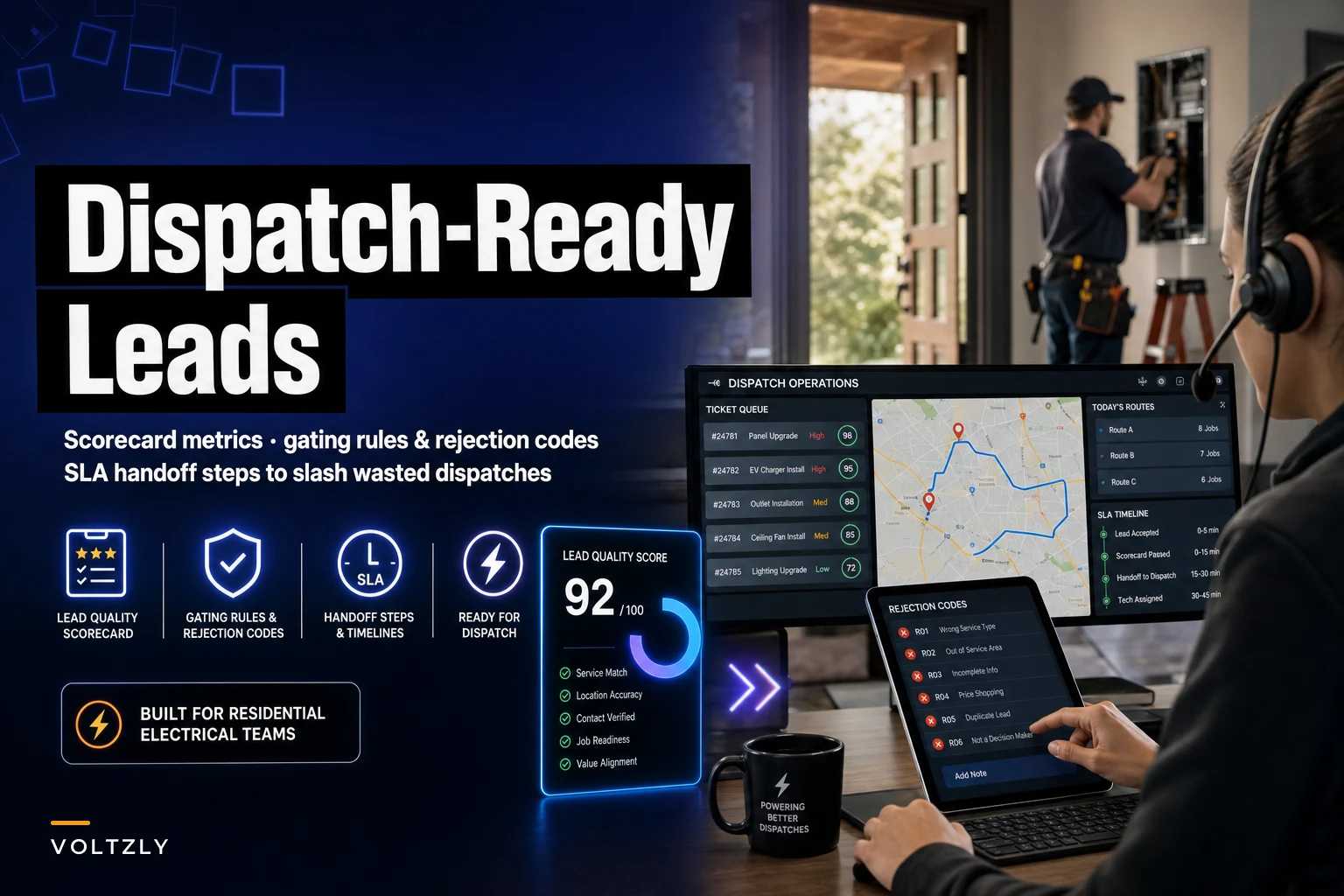

Every wasted dispatch has the same shape. A tech drives 35 minutes to a "panel issue" that turns out to be a tripped GFCI the homeowner could have reset themselves. Or the address is right but nobody's home because the call-taker never confirmed the window. Or the "customer" was actually a renter who can't authorize anything over $200. The tech logs it, drives back, and you've just burned two billable hours plus fuel on a call that never should have left the office.
The frustrating part is that most of these were detectable before the truck rolled. The gap sits between the person who takes the call and the person who works it. Closing that gap is what a lead quality scorecard for electricians actually does — it forces the intake step to answer the questions your tech will ask anyway, and gives dispatch a hard rule for what's allowed to hit the board.
This isn't about being picky with customers. It's about making sure the leads that reach a technician are dispatch-ready — meaning someone confirmed the scope, the decision-maker, the access, and the money before anyone put wheels on the road.
What "dispatch-ready" actually means
A lead is dispatch-ready when a technician can show up and start working without discovering a blocker in the first ten minutes. That's it. If the tech arrives and immediately hits a wall — wrong person, no access, out-of-scope, can't pay — the lead wasn't ready, regardless of how urgent it sounded on the phone.
-
Authority — the person requesting work can't approve or pay for it
-
Access — the tech can't physically get to the work (locked panel, tenant not home, dog, gated community with no code)
-
Scope — the actual job is different, bigger, or smaller than what was described
-
Solvency — the customer either can't afford the likely price or expected it to be free
The scorecard scores each lead against these four before it's booked. A lead that fails any hard gate doesn't get scheduled until the gap is fixed — it gets a rejection code and goes back to intake or into a follow-up queue.
The scorecard: what to score and how
Keep it simple enough that a call-taker can fill it out during the conversation. If it takes longer than 90 seconds it won't get used. Here's the structure that holds up in day-to-day intake without slowing the phones down.
Never miss a job or delay a dispatch again.
Voltzly helps you schedule, assign, and track every electrical job efficiently.
- Unified job scheduling
- Real-time technician tracking
- Automated client notifications
No credit card required
| Category | What you're confirming | Points | Hard gate? |
|---|---|---|---|
| Decision-maker on the line | Owner or authorized adult who can approve work | 25 | Yes |
| Property access confirmed | Someone will be home, or lockbox/gate code provided | 20 | Yes |
| Scope described + photo received | Panel photo, breaker label, or symptom video | 20 | No |
| Budget signal / payment method | Customer acknowledges diagnostic fee and rough range | 15 | Yes |
| Urgency correctly classified | Emergency vs. same-day vs. scheduled matches reality | 10 | No |
| Address + contact verified | Callback number confirmed, address plotted | 10 | Yes |
Total possible: 100.
The rule most shops land on: anything under 70, or any failed hard gate, does not get dispatched. It gets a rejection code and a defined next step. A lead scoring 70–85 gets booked normally. An 85+ can jump priority when the board is tight.
The hard gates matter more than the total score. A lead can score 80 on paper, but if nobody confirmed who's paying, it's not ready — the solvency gate failed and that number is meaningless. Treat the gates as pass/fail switches that sit on top of the point total, not as line items that can be averaged away.
A note on the photo requirement
The highest-leverage field on that scorecard is the panel photo. A homeowner texting a picture of their breaker box before dispatch eliminates a huge share of scope surprises — you can see the panel brand, the amperage, whether it's a known problem panel, whether there's rust or scorching, and whether the "simple breaker swap" is actually a full replacement. If you want the deeper version of this, the photo-first remote site validation checklist covers exactly what to ask for and how to read what comes back.
Rejection codes: give the "no" a name
Wasted dispatches keep happening because "this lead wasn't good" is invisible in most shops. It gets absorbed as normal friction. Nobody tracks it, so nobody fixes the intake behavior causing it.
-
R1 – No decision-maker (renter, spouse "needs to check," minor)
-
R2 – No access confirmed (nobody home, no code, blocked panel)
-
R3 – Scope mismatch (described minor, actually major, or vice versa)
-
R4 – Out of service area / trade (needs a plumber, needs a POCO, too far)
-
R5 – Price shock (expected free/cheap, won't pay diagnostic)
-
R6 – Not actually urgent (booked as emergency, was routine)
-
R7 – Unreachable (bad callback number, ghosted before confirm)
-
R8 – DIY-solvable (GFCI reset, tripped breaker, could self-resolve)
The pattern you'll see almost immediately: two or three codes account for most of the waste. Most residential shops find R1, R2, and R8 dominate. That tells you the intake script isn't confirming authority and access, and that after-hours triage is booking calls that never needed a truck. Now you're fixing a specific behavior instead of complaining about "bad leads" in general.
The pre-validation steps that produce ready leads
The scorecard tells you what to check. The pre-validation sequence is how the call-taker checks it during a normal call without making it feel like an interrogation. This is the actual workflow that turns a raw inquiry into a dispatch-ready lead.
-
Confirm who you're talking to first. Before scope, before scheduling: "Are you the homeowner, or renting?" and "Will you be the one meeting the technician?" This one question kills most R1 rejections before they start.
-
Get the symptom, then ask for a photo. "Can you snap a picture of your breaker panel and text it to this number? It helps us bring the right parts." Frame it as a favor to them, not a hurdle.
-
State the diagnostic fee out loud. "Our service call to diagnose is $X, and that goes toward the repair if you move forward." If they balk here, you've caught an R5 in the office instead of the driveway.
-
Confirm access specifics. Gate code, dog, where the panel is, whether it's a locked utility closet. Write it in the notes field, not just your head.
-
Classify urgency honestly. Ask what changed and when. "No power to half the house since this morning" is different from "an outlet stopped working last week." Book them accordingly.
-
Read back the appointment window and callback number. Confirming the number on the spot eliminates most R7 ghosting.
Steps 1, 3, and 4 map directly to the hard gates — that's intentional. The sequence is built so the gates get answered naturally in the flow of a normal booking conversation.
The workflow when a lead fails
When intake can't clear a gate, the lead doesn't die — it routes. A failed access gate goes to a "needs callback to confirm entry" queue. A price-shock lead gets a follow-up with financing options or a downgraded scope. A DIY-solvable call gets a quick over-the-phone reset attempt and a "call us back if that doesn't fix it."
Rejection is a fork in the workflow, not a dead end. This is the same discipline that makes a clean lead-to-cash workflow hold together — every step has a defined next move, and nothing just disappears into a void because intake couldn't close the gate on the first call.
Here's a quick visual of that intake -> validation -> route workflow.
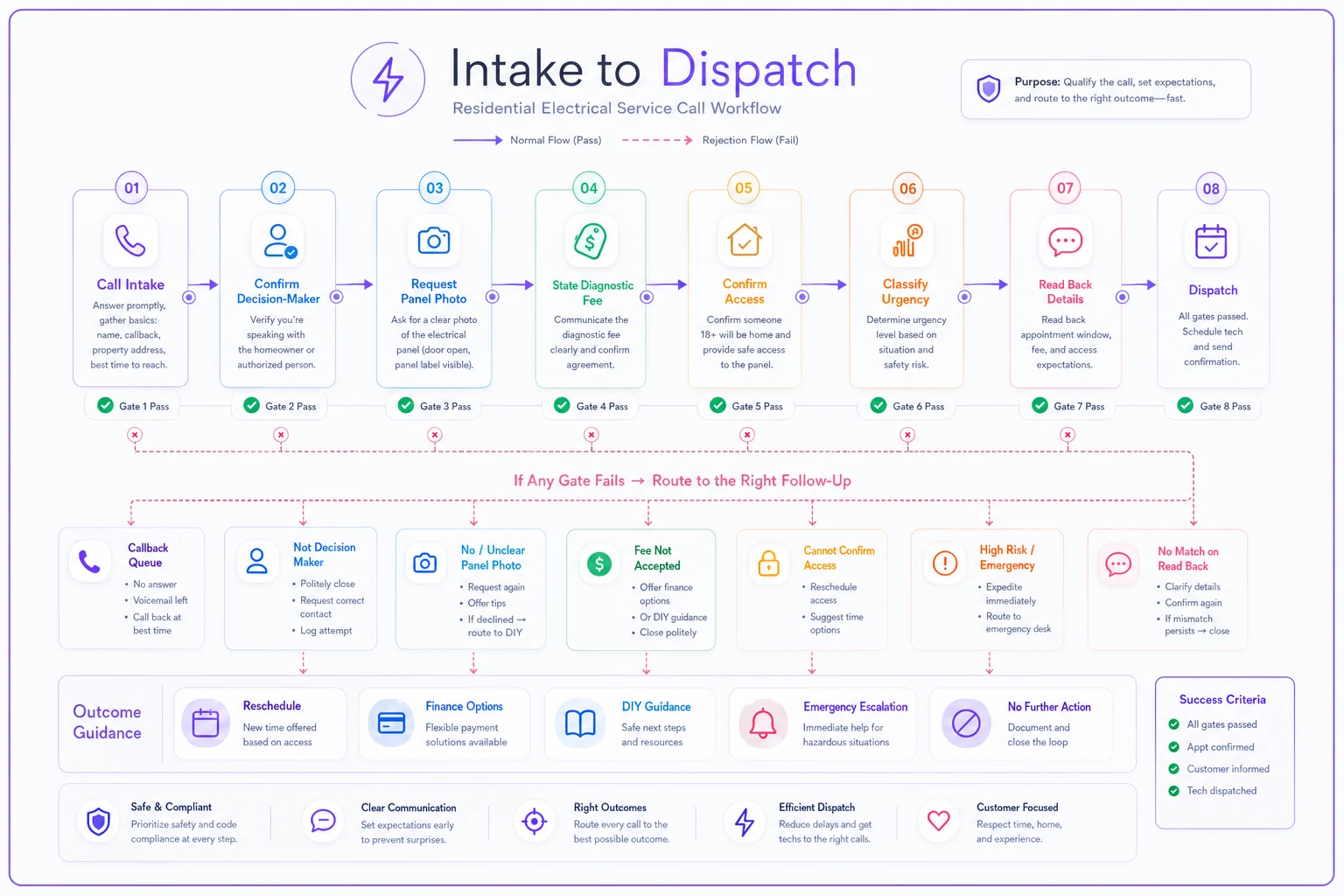
The visual highlights where gates are checked and where a lead gets redirected, so teams can see where to intervene.
Sample handoff SLA between intake and dispatch
> Intake → Dispatch Handoff SLA
> Intake commits to:
-
Every dispatched lead scores 70 or higher on the lead-quality scorecard with all four hard gates cleared (decision-maker, access, budget signal, verified contact).
-
A panel or symptom photo is attached to at least 80% of scheduled residential calls.
-
Any lead failing a gate is tagged with a rejection code and routed to the correct follow-up queue within the same shift.
> Dispatch commits to:
-
Accepting and scheduling any lead that meets the bar within 15 minutes during business hours.
-
Not rejecting a qualifying lead without a documented reason.
-
Reporting any field-discovered bust back to intake with the matching rejection code within 24 hours.
> Shared metric: Wasted-dispatch rate (busted calls ÷ total dispatches) reviewed weekly. Target: under 8%.
The field-feedback loop in that last intake line is what makes the whole thing self-correcting. When a tech tags an R2 from the driveway, that data flows back and shows intake exactly which access questions got skipped. Without that loop, the scorecard slowly drifts — nobody knows if it's working, scores stop meaning anything, and the bust rate quietly climbs back up.
The metrics that tell you it's working
You only need a handful. Track these weekly and the story becomes obvious fast.
-
Wasted-dispatch rate — busts ÷ total dispatches. The headline number.
-
Rejection code distribution — which codes dominate, trending over time.
-
Average scorecard score at booking — should climb as intake habits improve.
-
Photo attach rate — leading indicator; it moves before the bust rate does.
-
Field-confirmed busts vs. office rejections — you want more caught in the office, fewer in the field.
The metric people overlook is the ratio between office rejections and field busts. If you're rejecting plenty of leads in the office and still eating field busts, your gates are checking the wrong things. If office rejections are near zero but field busts are high, intake is rubber-stamping everything.
The healthy pattern is office rejections rising while field busts fall — that means the catching is moving upstream, which is exactly the goal. Once you see that shift happening in the weekly numbers, the scorecard is actually doing its job.
Real scenario
A three-truck residential shop was running roughly 240–260 dispatches a month with a bust rate hovering around 17%. That's somewhere around 40 wasted rolls monthly — call it two lost billable hours each between drive time and reset, plus fuel. At their loaded labor cost, they were bleeding somewhere in the range of $4k–$6k a month on calls that never should have shipped.
They put the scorecard in, made the four hard gates non-negotiable, and started tagging rejection codes. First month, the data was blunt: R1 and R8 together accounted for roughly 60% of the busts. Renters authorizing work that got vetoed later, and after-hours "emergencies" that were tripped breakers.
The fixes were small. Intake started asking "homeowner or renter?" as the opening question, and after-hours calls got a quick reset walk-through before any truck was promised. By month three the bust rate had settled around 7–8%. Not perfect — some field surprises are unavoidable — but they'd cut wasted rolls roughly in half and freed up close to a full day of tech capacity a week without hiring anyone.
The owner's comment stuck: they hadn't gotten better at working jobs, they'd gotten better at deciding which jobs to send a truck to.
When this makes sense — and when it doesn't
This makes sense if you're running two or more trucks, your dispatchers and call-takers are different people (or the same person wearing both hats and losing track), and you've noticed techs complaining about junk calls. Any shop rolling more than a handful of trucks a day will get the effort back within weeks just in recovered drive time.
This is overkill if you're a solo operator who takes and works every call yourself. You already carry all the context in your head — a formal scorecard just adds paperwork. The moment you hire your first tech and hand off dispatch decisions, though, that context needs to live somewhere written, and that's when the scorecard earns its keep.
Who should be careful: shops with a heavy repeat-and-referral base where the decision-maker gate might annoy long-time customers. Adapt the language — a known customer of eight years doesn't need to prove they can authorize work. Build a fast-track lane for existing accounts so the scorecard tightens intake without souring relationships you've spent years building.
Making it stick
The scorecard and SLA fail the same way every operational tool fails: they get built, celebrated in one meeting, and quietly abandoned by week three. What keeps it alive is the weekly five-minute look at the rejection code distribution. As long as someone is staring at which codes dominate and asking "why," intake behavior keeps improving and the busts keep dropping.
Most shops start on a whiteboard or a shared sheet, which is fine to prove the concept. It stops scaling once you're past a few trucks — scores live in one place, rejection tags in another, and field feedback never makes it back. That's usually when teams move the whole loop into their scheduling or field-service platform, so scorecard fields are required at booking, rejection codes are dropdowns, and bust data flows back to intake automatically instead of depending on someone remembering to log it.
Make the rejection-code distribution a standing five-minute agenda item in your weekly ops meeting so it stays visible.
The tooling isn't the point, though — the discipline is. A shop running this rigorously on paper will beat a shop with great software and no follow-through every single time.
Wasted dispatches aren't a leads problem or a tech problem. They're a decision that got made without enough information, one call at a time. Put the information back into the decision, and the trucks start rolling to jobs that are actually there.
Ready to optimize your electrical service operations?
Join 500+ electrical service companies using Voltzly to improve scheduling accuracy, enhance client satisfaction, and boost operational efficiency.