



Most electrical contractors lose money in the gaps between their systems. Not from bad estimates or slow techs—from the handoffs. Between lead intake and qualification. Between estimates and scheduling. Between job completion and invoicing.
The lead to cash workflow electrical contractors actually need isn't about better software or working harder. It's about building gates between each stage that stop bad jobs from moving forward and keep good jobs from stalling out.
The pattern across electrical businesses that scale from owner-operator to 15+ techs is pretty consistent: the ones that grow profitably have strict operational gates with clear rejection codes at each stage. The ones that struggle let everything flow through and hope for the best.
Why traditional workflows break for electrical work
Electrical contractors face a unique operational challenge that plumbers and HVAC companies don't really deal with: extreme variance in job complexity within the same service category. A "panel upgrade" could mean swapping a 100-amp panel in a garage (4 hours) or rewiring half a house for a 200-amp service with a new meter base and service entrance (3 days). Both come in through the same lead form.
That variance creates cascading problems. Your CSR qualifies based on keywords. Your estimator shows up to something completely different. Your tech gets dispatched without the right parts. Your office manager invoices off the original quote. Everyone loses something.
The traditional linear workflow—lead comes in, someone estimates, someone schedules, work gets done, someone invoices—assumes each stage has complete information. In electrical work, that assumption kills margins.
Standard CRMs make it worse. They're built for sales pipelines where stages track relationship progress: contacted, qualified, proposed, negotiating, closed. Electrical contractors need operational gates based on technical validation: electrical load verified, panel accessibility confirmed, permit requirements identified, utility coordination confirmed. Different problem entirely.
The five-gate system that actually works
A functional lead to cash workflow for electrical contractors needs five hard gates, each with specific pass/fail criteria and rejection codes. No job moves forward without passing the gate.
Never miss a job or delay a dispatch again.
Voltzly helps you schedule, assign, and track every electrical job efficiently.
- Unified job scheduling
- Real-time technician tracking
- Automated client notifications
No credit card required
Here's a simple visual of the five-gate workflow.
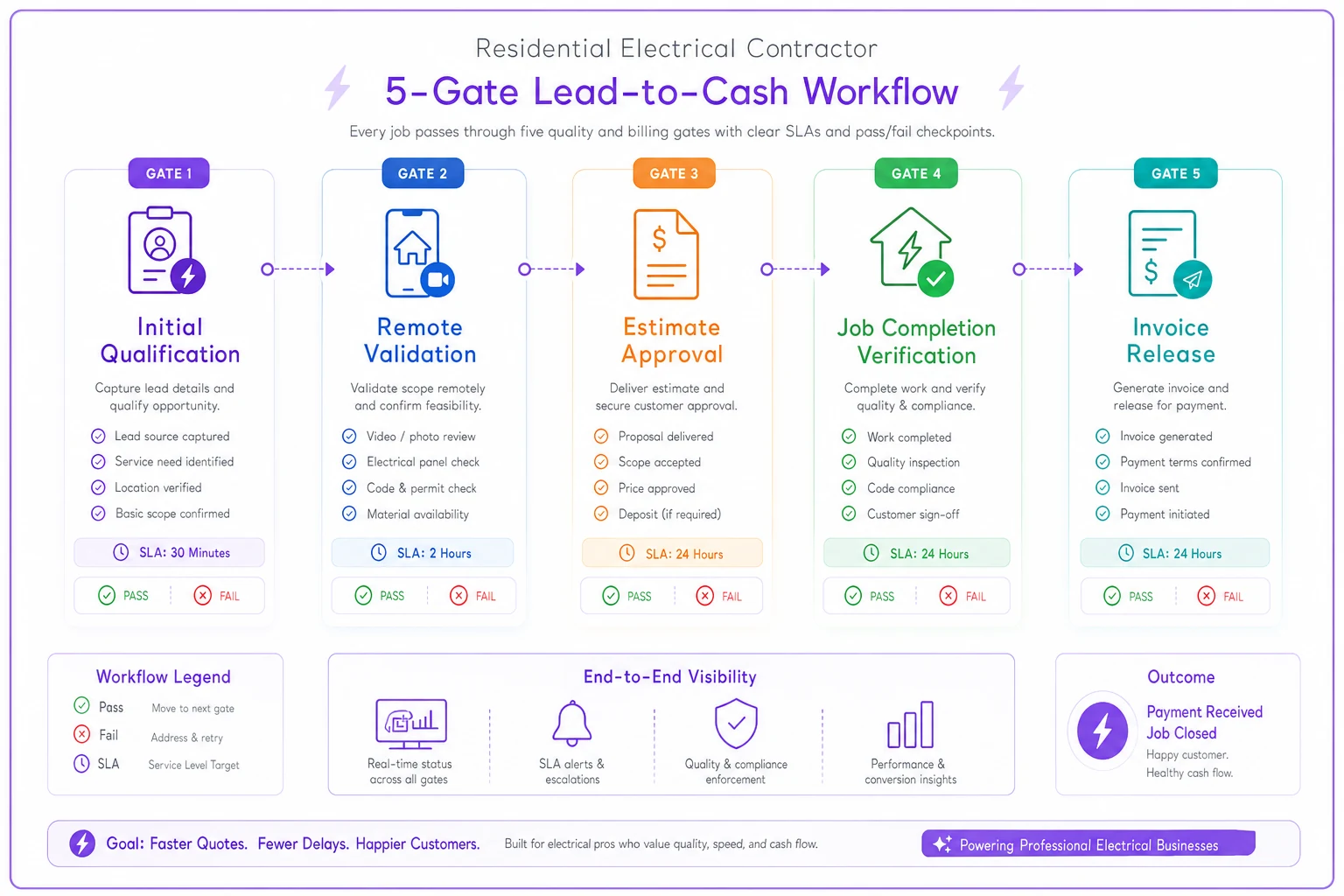
Gate 1: Initial Qualification (Phone/Form)
-
Service address has valid electrical permit history
-
Described work matches service capability
-
Budget expectation within 50% of typical range
-
Timeline allows proper scheduling
-
NP1
No permit history at address (possible unpermitted work)
-
SC1
Service outside capability (commercial voltage, industrial equipment)
-
BE1
Budget expectation under 40% of minimum viable
-
UT1
Urgent timeline incompatible with permit requirements
SLA: Decision within 5 minutes of initial contact.
The key is training your intake person to ask diagnostic questions, not sales questions. "When was your electrical panel last updated?" tells you more than "How soon do you need this done?" One reveals permit history and scope. The other just creates pressure.
Gate 2: Remote Validation (Before Dispatch)
-
Photos show accessible work area
-
Existing equipment model numbers identified
-
No visible code violations requiring additional work
-
Utility requirements confirmed
-
PH1
Photos reveal inaccessible equipment
-
CD1
Code violations present (must address before quoted work)
-
UT2
Utility work required outside scope
-
EQ1
Equipment incompatible with proposed solution
SLA: Validation within 4 hours of receiving photos.
Customers will happily send photos if you make it easy. Text them a link with specific photo instructions. "Photo 1: Full panel with door open. Photo 2: Main breaker close-up. Photo 3: Wall where panel is mounted, showing clearance." Most people follow instructions when they're clear.
Gate 3: Estimate Approval (With Contingencies)
-
Margin meets minimum for job type (not negotiable)
-
Contingency items explicitly listed with triggers
-
Payment terms accepted (deposit received for materials)
-
Schedule slot confirmed with capacity check
-
MG1
Margin below 35% after negotiation
-
DP1
Deposit not received within 48 hours
-
SH1
No schedule availability within customer window
-
CN1
Customer won't accept contingency terms
SLA: Approval or rejection within 24 hours of estimate delivery.
The contingency list matters more than most contractors realize. Every estimate should include something like: "Additional charges apply if asbestos is discovered, panel replacement requires drywall work, utility service upgrade is needed, or code requires additional circuits." Price each contingency separately. When they trigger, you're not renegotiating—you're executing pre-approved terms.
Gate 4: Job Completion Verification
-
All photo documentation uploaded
-
Test results recorded (megger readings, circuit tests)
-
Customer signature on completion form
-
Contingency work documented with photos
-
Materials used match estimate (or variance explained)
-
DC1
Documentation incomplete (missing photos/signatures)
-
TS1
Test results outside acceptable range
-
MT1
Material variance exceeds 15% without explanation
-
CX1
Customer refusing signature (investigate immediately)
SLA: Documentation complete within 2 hours of leaving site.
Gate 5: Invoice Release
-
All gate 4 documentation reviewed
-
Change orders signed by customer
-
Payment method confirmed and processed
-
Follow-up inspection scheduled if required
-
PD1
Payment method declined
-
CO1
Change order documentation missing
-
IN1
Inspection failed (must resolve before payment)
-
DS1
Documentation discrepancies found
SLA: Invoice sent within 4 hours of job completion.
| Gate | SLA |
|---|---|
| Gate 1: Initial Qualification (Phone/Form) | Decision within 5 minutes of initial contact. |
| Gate 2: Remote Validation (Before Dispatch) | Validation within 4 hours of receiving photos. |
| Gate 3: Estimate Approval (With Contingencies) | Approval or rejection within 24 hours of estimate delivery. |
| Gate 4: Job Completion Verification | Documentation complete within 2 hours of leaving site. |
| Gate 5: Invoice Release | Invoice sent within 4 hours of job completion. |
The key is training your intake person to ask diagnostic questions, not sales questions. "When was your electrical panel last updated?" tells you more than "How soon do you need this done?" One reveals permit history and scope. The other just creates pressure.
Template library that prevents operational drift
Templates aren't just time-savers—they're quality controls. Every customer interaction follows a script until you've proven it doesn't need one.
Lead Qualification Script:
"I see you're interested in [SERVICE]. To make sure we send the right electrician with the right materials, I need to understand your electrical setup. Is this a residential property? Great. Do you know when your electrical system was last updated? Can you see your electrical panel right now—is it easily accessible?"
That gets you permit history, scope indicators, and accessibility in about 30 seconds.
Rejection Templates:
Instead of "We can't help you," use specific operational language:
"Based on your description, this project requires commercial-grade three-phase equipment, which is outside our residential service focus. I'm sending you contact information for two commercial contractors who specialize in this work."
Preserves reputation, maintains operational boundaries.
Photo Request Templates:
-
Your main electrical panel with the door open
-
The breaker that controls the circuit in question
-
The area where work will be performed
-
Any existing wiring visible in the work area
Text photos to: [NUMBER] or upload here: [LINK]
Contingency Language:
-
This estimate assumes standard residential construction (drywall over wood framing). Additional charges apply for:
-
Concrete/masonry work
$200–400
-
Asbestos-containing materials
Stop work, specialist required
-
Additional circuits required by code
$350 per circuit
-
Permit modifications due to inspector requirements
Time & materials
Every template above helps prevent operational drift by standardizing responses and expectations.
What changes as you scale from 2 to 20 techs
At 2–3 techs, the owner handles most gates personally. You qualify leads, validate remotely, approve estimates. The system is basically your experience and judgment.
At 5–7 techs, you need a dedicated coordinator. This person owns gates 1–3 and gets jobs ready for field execution. The trap here: without strict gate criteria, that person becomes a bottleneck, holding jobs while chasing perfect information.
At 10–12 techs, geographic complexity enters. Downtown permits take 3 weeks. Suburban permits clear in 3 days. Your rejection codes expand—something like "DT1: Downtown permit timeline exceeds customer needs."
At 15–20 techs, you need redundancy at each gate. Multiple people approving estimates. Multiple people handling initial qualification. But they must use identical criteria. "Jim's more flexible with margins" is how margins disappear.
The breakdown usually happens around 8–10 techs. The owner can't review everything but hasn't built strict enough gates for others to decide confidently. Jobs slip through that shouldn't. Good jobs get rejected for no real reason. The fix isn't more oversight—it's clearer gates.
Common failure points across the workflow
The "Just This Once" Failure
A good customer needs emergency work. You skip remote validation just this once. Your tech arrives to find knob-and-tube wiring behind a finished ceiling. The 2-hour job becomes a code compliance nightmare.
Every gate skip compounds. Skip qualification, your estimator wastes a site visit. Skip remote validation, your tech shows up without the right materials. Skip completion verification, invoicing stalls for weeks.
The Information Hoarding Failure
Your experienced estimator knows every local inspector's preferences. But that knowledge lives in their head. When they're out sick, jobs fail inspection because the replacement doesn't know that Inspector Johnson requires torque specs on panel connections.
Document the tribal knowledge. Which inspectors require what. Which neighborhoods have aluminum wiring. Which permit clerks will expedite. This operational intelligence belongs in your workflow, not in one person's memory.
The Margin Leak Pattern
It starts small. A customer negotiates 5% off. You accept to fill a schedule gap. They refer a friend who expects the same discount. Suddenly you're wondering why gross margins dropped from 48% to 41% despite being busier than ever.
Gates must include non-negotiable margin floors. Track these metrics systematically and review them weekly. The moment margins slip below your floor, that customer segment gets rejected until pricing adjusts.
The Scope Creep Cascade
Panel upgrade reveals a federal panel. Federal panel requires full rewire. Full rewire reveals an insufficient service entrance. Each expansion seems logical, but now you're doing $12,000 of work on a $3,500 approval. Proper contingency planning stops this cascade before it starts.
Why rejection codes matter more than conversion rates
Most contractors track conversion rate: what percentage of leads become jobs. That metric pushes you toward accepting marginal work. Converting more leads feels like growth.
Rejection codes tell the real story. When you code every rejected lead, patterns surface fast:
-
Rejecting 40% of leads for budget expectations (BE1)? Your marketing attracts the wrong customers.
-
Rejecting 30% for accessibility issues (PH1)? Add an accessibility question to your intake form.
-
Rejecting 25% for rushed timelines (UT1)? Advertise realistic permit timelines upfront.
Track rejection codes for 90 days and you'll see exactly where your operation wastes energy. More importantly, you'll see which rejections are protecting you (margin floors) versus which ones reveal fixable problems (poor initial communication with customers).
Building feedback loops between stages
Your gates need to communicate in both directions. When Gate 4 repeatedly finds material variances, Gate 3 needs updated templates. When Gate 2 keeps missing access issues, Gate 1 needs better intake questions.
Monthly gate reviews should look at:
-
Which gates have the highest rejection rates
-
Which rejection codes trigger most often
-
Time between gates (are the SLAs actually realistic?)
-
Override patterns (who bypasses gates and why?)
One contractor found that their Gate 2 remote validation caught federal panels 90% of the time, but Gate 1 never asked about panel brand. Adding one question—"Can you read me the brand name on your electrical panel?"—eliminated hours of wasted estimation time.
Technology integration without complexity
The right operational software transforms this workflow from a paper checklist into something that actually enforces itself. When a lead enters, AI-powered qualification can check permit databases automatically, flag addresses with violation history, and factor in travel time for your crews.
But the technology should enforce your gates, not replace the judgment behind them. Automated permit checking speeds up Gate 1, but a human still decides whether "permit expired 2019" means unpermitted work or a stable system with no recent changes.
Photo validation can identify federal panels, aluminum wiring, and code violations quickly. But your Gate 2 operator still needs to determine whether that cloth wiring in the background is active or abandoned.
The technology that actually improves lead to cash workflow for electrical contractors isn't trying to be smart—it's trying to be consistent. It enforces SLAs, won't let jobs advance without gate completion, and creates an audit trail when someone overrides a decision.
Most importantly, it connects your gates. When Gate 3 approves an estimate with contingencies, Gate 4 already knows what documentation to look for. When Gate 5 processes an invoice with a change order, your system automatically updates estimate-to-actual variance tracking.
The compound effect of operational gates
A single gate might catch 5% of problem jobs. Five gates, each catching different issues, protect you from a much larger portion of potential disasters. But more than the math, consistent gates train your entire organization to think operationally.
Your CSR stops overpromising because they know Gate 2 will catch the problem anyway. Your estimator prices correctly because Gate 3 enforces the margin floor. Your techs document everything because Gate 4 requires it before the job closes. Your office manager invoices quickly because Gate 5 has everything it needs.
That cultural shift—from "get the job done" to "get the job done right"—happens naturally when the gates are consistent and non-negotiable. People stop seeing them as bureaucratic obstacles and start seeing them as protection from expensive mistakes.
Start with one gate. Pick the stage where you lose the most money. Implement strict criteria, track rejections for 30 days, then add the next gate. Within six months, you'll have an operational system that scales predictably, protects margins without constant intervention, and doesn't require the owner to personally catch every problem.
The alternative—hoping each job works out, fixing problems as they appear, wondering why you're busier than ever but not more profitable—isn't sustainable. Build the gates. Enforce the standards. The operation either runs on systems or it runs on stress.
Ready to optimize your electrical service operations?
Join 500+ electrical service companies using Voltzly to improve scheduling accuracy, enhance client satisfaction, and boost operational efficiency.