

Stop letting your software own your job data
Most 2–50 tech electrical shops don't have a data problem the way software vendors describe it. They have a data ownership problem, a format problem, and a nobody-agreed-on-this problem — all wearing the costume of a technology issue.
You already collect a huge amount of field information. Photos, panel readings, permit numbers, part serials, customer signatures, drive times, tech notes scribbled into whatever app came bundled with your invoicing tool. The trouble isn't that the data doesn't exist. It's that it lives in six places, gets named eleven different ways, and belongs to whoever happened to touch the job last.
So when it's time to reprice a job type, defend a warranty claim, or move to a new dispatch platform, you find out the hard way that your "data" is really just a pile of disconnected artifacts. Nobody warns you about this when they sell you software: the tool changes, but the mess follows you into the new one.
A real field service data strategy for small contractors isn't about picking the perfect app. It's about designing a tech-agnostic data model — one that survives the next three software migrations you'll inevitably go through — and migrating toward it in a way that doesn't blow up a single week of dispatch.
The trap of building your data around the tool instead of the work
There's a pattern that quietly kills small shops. You pick a field service platform. Your whole way of recording jobs gets shaped by that platform's fields, its dropdowns, its photo folders, its naming quirks. Two or three years later the pricing changes, or the product stops fitting a 12-tech operation, or you get pulled into a bigger workflow — and you realize every piece of history you have is locked into a format that only that tool understands.
When you export it, you get a CSV that makes no sense. Job types don't map. Custom fields turn into gibberish columns. Photos come out as a zip of IMG_4471.jpg with zero connection to which job they belonged to.
The deeper issue is that your business logic was living inside the software instead of inside your own data model. That's backwards. The tool should be a replaceable window into your data — not the thing that defines what your data even is.
Shops that scale cleanly tend to do the opposite. They decide, on paper, what a "job record" actually contains regardless of which app they're running this year. Panel amperage. Permit status. Before/after photos with a fixed naming convention. Part serials. Tech ID. Cycle time. Those definitions don't change when the software does. The software just has to hold them.
What a tech-agnostic field-data model actually looks like
Forget vendor language for a minute. A durable field-data model for a small electrical shop breaks into five layers, and each layer answers a different operational question.
Never miss a job or delay a dispatch again.
Voltzly helps you schedule, assign, and track every electrical job efficiently.
- Unified job scheduling
- Real-time technician tracking
- Automated client notifications
No credit card required
| Layer | What it captures | The question it answers | Where it usually breaks |
|---|---|---|---|
| Job identity | Job ID, customer, address, job type, service tier | "What was this and who was it for?" | Duplicate customers, inconsistent job-type labels |
| Scope & specs | Photos, panel specs, load calcs, permit numbers | "What did we actually agree to do?" | Photos with no naming rules, permits tracked in email |
| Execution | Tech ID, hours, parts + serials, drive time | "What did it cost us to deliver?" | Parts not tied to serials, hours logged late |
| Financial | Estimate, actuals, change orders, invoice, payment date | "Did we make money?" | Estimate lives in one tool, actuals in another |
| Compliance | Inspection result, warranty flags, signoffs | "Can we defend this in 18 months?" | Signoffs on paper, inspection results in a text thread |
The point of laying it out like this isn't to build a database from scratch. It's to have a shared definition so that when you evaluate any tool — or migrate off one — you can ask a single question: does this hold all five layers, and can I export them cleanly?
Most shops discover their current setup nails two layers and completely neglects the other three. Execution and financial data especially tend to live in separate universes, which is exactly why estimate-to-actual comparisons are so painful to run. If you want your job history to actually teach you something, those five layers have to reference the same job ID — not five different ones.
For the naming and photo side specifically, it's worth being deliberate about photo packs, naming rules and retention policies before you have thousands of files to untangle.
Ownership and governance: the part everyone skips
Software doesn't create data chaos. Unclear ownership creates data chaos, and software just scales it.
In a 3-tech shop, one person — usually the owner or an office lead — quietly owns everything by default. They know that "PanelUpgradeFinalv2" and "panel done" mean the same thing. That tribal knowledge holds the whole system together. It also disappears the moment that person goes on vacation, gets overloaded, or quits.
At 8, 15, 30 techs, tribal knowledge stops working. Now you have four people entering job data slightly differently, and there's no rule that says which way is right. Nobody owns the definitions. Everybody owns the entry. That's the recipe for a database that looks full but tells you nothing.
-
One owner per data layer. Someone owns job identity rules. Someone owns photo and naming standards. Someone owns financial close. In a small shop it can be the same person wearing three hats — the point is the hat is explicit.
-
A single source of truth per field. If permit numbers live in the dispatch tool, they do not also live in a spreadsheet. Pick one home per field.
-
A naming standard that a new tech can follow on day one without asking anyone what "final" means.
-
A retention rule. How long do photos, signoffs, and inspection records stick around? Compliance and warranty windows should decide this, not your storage bill.
-
A weekly integrity check. Someone spends 20 minutes confirming last week's jobs actually have all five layers filled in.
That last one sounds trivial and it's the most valuable. Shops with clean data aren't the ones with fancy tools — they're the ones who catch a missing serial number three days after the job instead of three months later when a warranty claim lands.
If you're building broader operational discipline around this, it fits naturally inside a wider set of SOPs, handoffs and decision triggers so data governance isn't a separate initiative — it's just how work already flows.
API priorities: what actually needs to connect, and what doesn't
When shops start thinking about connecting systems, they usually overreach. They want everything talking to everything, and they burn months and real money wiring up integrations they'll use twice.
The smarter approach flips the priority. You don't integrate for integration's sake. You integrate the connections where manual re-entry causes real financial leakage. Everything else can wait.
-
Dispatch/scheduling → job record. If a tech closes a job and it doesn't flow into the job history automatically, you're re-typing everything and losing execution data. Highest-value pipe by a wide margin.
-
Job record → invoicing. The gap between "job done" and "invoice sent" is where cash goes to die.
-
Parts/inventory → job record. Serials and quantities need to attach to the job automatically, or your job costing is a guess.
-
Job record → accounting. Actuals should reach your books without someone re-keying them at month-end.
-
Everything else. Marketing tools, review requests, dashboards. Nice, not urgent.
When you evaluate any platform, the real API question isn't "does it have an API?" Almost everything does now. The real questions are: can I get my full job record out, in a format that maps to my five layers, without paying for professional services every time? And: does the export include the relationships between records, or just flat tables that lose the connections?
A platform that traps your data behind an expensive export is a platform you'll be paying to leave someday. Factor that into the buy decision, not just the monthly fee.
The low-risk migration playbook
This is where most shops get hurt. The failure mode is almost always the same — someone decides to switch everything at once, over a weekend, and Monday morning dispatch is a disaster because half the tech notes didn't come over and nobody knows the new workflow.
You don't migrate a field-service operation with a big-bang cutover. You migrate it with pilots, checkpoints, and a rollback plan.
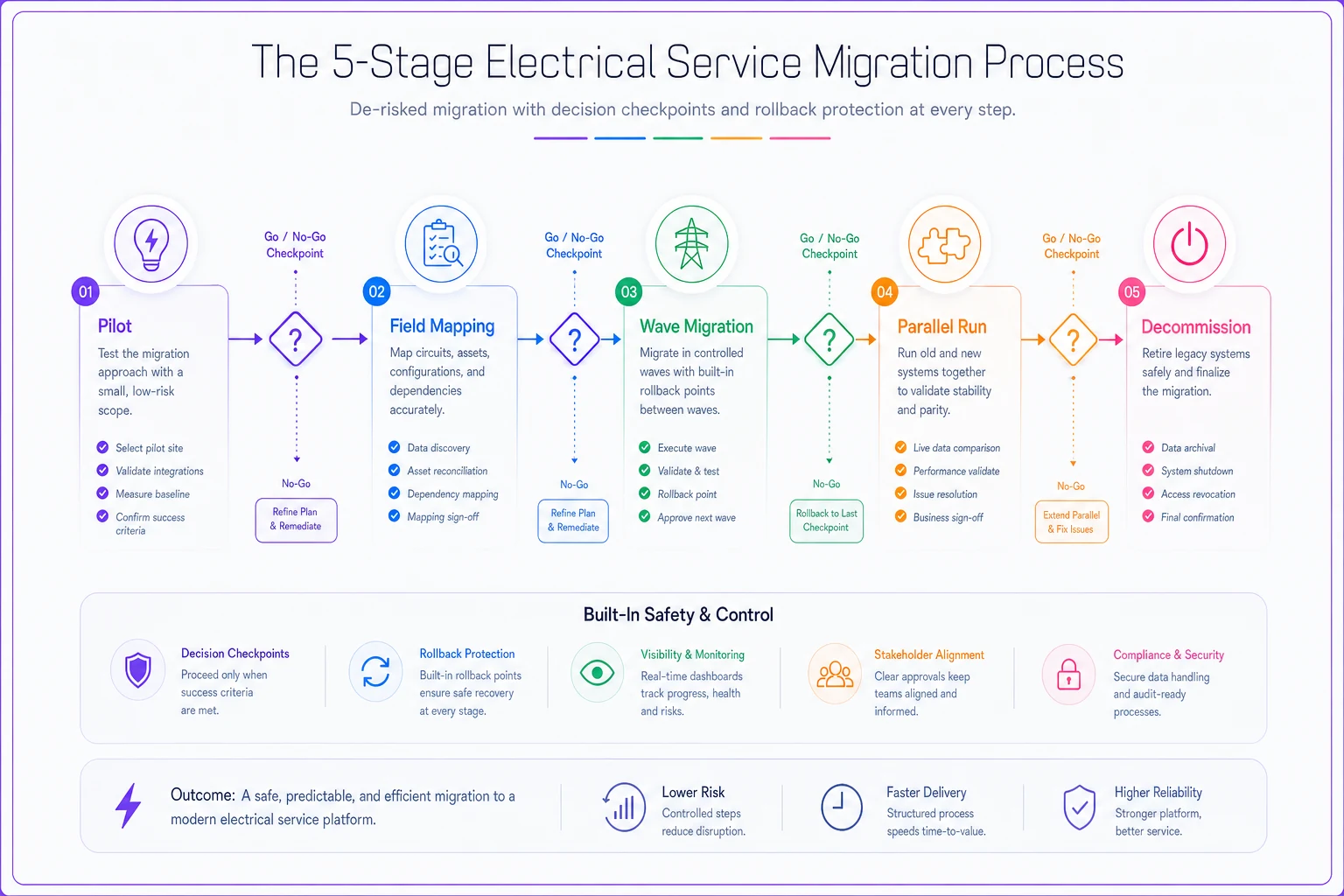
The diagram outlines the five-stage migration flow and key decision points.
Step 1: Run a minimal-risk pilot
Pick the lowest-stakes slice of your operation. Usually that's one job type — say, straightforward service calls — or one small crew. Run that slice on the new system for two to three weeks while everything else stays put. You're not trying to prove the software works. You're trying to find out what breaks in your real workflow — the field that doesn't map, the photo step your techs skip, the export that comes out wrong.
Step 2: Map the five layers before you move any history
Before a single record migrates, sit down and map old fields to your five-layer model. This is where you catch the fact that your old "notes" field secretly held three different types of data. Fixing that mapping now saves you from importing garbage into a clean system.
Step 3: Migrate in waves, with a rollback point at each
Move one job type or one crew at a time. After each wave, stop and check:
-
Did all five layers come over intact?
-
Can dispatch run a full day without workarounds?
-
Are photos still attached to the right jobs?
-
Can you pull an estimate-to-actual on a migrated job?
If any answer is no, you pause and fix — you don't push forward. Every wave has a defined rollback point so a bad migration never takes down the whole shop.
Step 4: Run both systems in parallel where it matters
For the connections that touch money — invoicing, payments, job costing — keep the old system readable for one full billing cycle. Compare a few closed jobs across both systems and confirm the numbers match before you fully trust the new one.
Step 5: Decommission only after a clean cycle
Don't kill the old system the day migration "finishes." Wait until you've run a complete month — including a month-end close and at least one inspection or warranty lookup — entirely on the new setup with no fallback. Then archive the old data in your tech-agnostic format, not the vendor's proprietary one.
Migration checkpoints tuned to a 2–50 tech shop
The checkpoints below are the ones that actually catch problems before they cost you.
-
Pre-migration Five-layer model documented. Field mapping written down. Rollback plan defined. One owner assigned per layer.
-
Pilot complete Real workflow tested on a low-stakes slice. Broken fields identified. Techs can complete a job without asking for help.
-
After each wave All five layers verified on migrated jobs. Dispatch runs clean for a full day. Photos correctly linked. Financial data reconciles.
-
Parallel period One full billing cycle compared across both systems. Numbers match. No missing invoices.
-
Decommission One complete month run solo. Month-end close done. Compliance lookup tested. Old data archived in a neutral format.
The reason these checkpoints matter more for small shops than large ones is straightforward: you don't have a bench. A big company absorbs a rough migration week with extra staff. A 6-tech shop losing a week of dispatch coordination feels it directly in cashflow. Checkpoints convert a scary switch into a series of small, reversible steps.
When this level of rigor makes sense — and when it doesn't
When it's worth it: You're past roughly 5–6 techs, you're planning to grow, or you've already been burned once by a messy export or a tool you couldn't leave. If you're repricing job types, defending warranty claims, or trying to run real estimate-to-actual analysis, you need the five-layer discipline. It's also non-negotiable if you're heading into any kind of acquisition, partnership, or financing conversation — clean, portable data materially affects your valuation.
When it's overkill: If you're a 2-person shop doing 40 jobs a month and the owner personally touches every record, a full governance framework will slow you down more than it helps. Get the naming conventions and the single-source-of-truth rule in place, skip the rest until you feel the pain. Premature structure is its own kind of waste.
Who should NOT do a full migration right now: Anyone in peak season. Anyone mid-hiring-spree with untrained techs. Anyone whose current data is such a mess that they'd just be importing chaos into a nicer container — clean the data model first, then move.
A real scenario: the 11-tech shop that couldn't answer a simple question
An 11-tech residential and light-commercial shop wanted to know which job types were actually profitable. Reasonable question. Should've taken an afternoon.
It took three weeks. Estimates lived in one tool, actual hours in the dispatch app, parts in a spreadsheet the office manager kept, and payments in the accounting software. Nothing shared a job ID. To answer "did panel upgrades make money last quarter," someone had to manually cross-reference four sources for around 60 jobs — and even then the numbers were shaky because parts weren't tied to serials and half the drive times were never logged.
They spent about six weeks building a tech-agnostic five-layer model and migrating in waves — service calls first, then EV installs, then panel work. Nothing fancy. Consistent job IDs, a naming standard, and the four highest-priority API connections wired up so execution and financial data finally lived under the same record.
The payoff wasn't dramatic revenue growth. It was that a question which used to take three weeks now takes about ten minutes. They found one job type they'd quietly been losing roughly $200–$400 on per ticket, repriced it, and stopped the bleed. And the next time they evaluate a new platform, migrating is a two-week checkpointed process instead of a terrifying gamble — because the data belongs to them now, not to the software.
Once your data actually holds together like this, the metrics that should drive real decisions — when to hire, retrain, or reprice — become something you can actually trust instead of something you argue about at month-end.
The mindset shift that makes all of this stick
The shops that never get trapped by their software share one belief: the data is the asset, the tool is a rental. You will change platforms. Probably more than once. The only question is whether each change costs you a painful week and a chunk of your history, or a calm two-week checkpointed migration where everything comes across clean.
A tech-agnostic field-data model, clear ownership rules, a short list of API priorities, and a migration playbook built on pilots and rollback points — that's not overhead. That's the thing that keeps you free to pick the best tool for your size at every stage of growth, instead of staying married to whatever you signed up for three years ago.
Build the model once. Own the definitions. Then let the software come and go.
Ready to optimize your electrical service operations?
Join 500+ electrical service companies using Voltzly to improve scheduling accuracy, enhance client satisfaction, and boost operational efficiency.