



Most electrical shops don't pick software in a calm week. They pick it right after something went wrong. Maybe a $4k service call never got invoiced. Maybe the dispatcher quit and took the whole schedule with her, because it lived in her head and on a whiteboard. Maybe the accountant sent a sharp email about 40 unmatched payments. So the owner books three demos, likes the one with the nicest dispatch board, signs an annual contract, and spends the next four months finding out what the demo skipped.
The subscription is the cheap part of a bad pick. The expensive part is the double-entry period, which nobody budgets for. The office runs the old system and the new one side by side. Techs close jobs on paper "just this week." Invoices slide from two days to nine. Payments land in accounting with no job attached. Shops tend to give up quietly around month three or four. They keep paying for the tool and use maybe a fifth of it.
This playbook is meant to help you avoid that. It isn't a list of the best field service apps, because the best app for a 4-tech residential shop is often the wrong one for a 30-tech outfit doing tenant improvements. It's a way to choose, test and commit to technology (or walk away from it) without betting your cash flow on a sales demo.
The mistake happens before anyone opens a demo
The usual failure is buying to fix the loudest symptom. The owner felt the missed invoice, so the search becomes "software with better invoicing." But the real problem was upstream. The tech never recorded the extra circuit he added, so the invoice was wrong before anyone typed it. New invoicing software doesn't fix that. It just produces wrong invoices faster.
Before you look at any vendor, write the problem down as a broken workflow, not a missing feature. "We need GPS tracking" is a feature wish. "Dispatch can't tell whether a tech will finish his current job in time for a 2pm window, so we call him three times a day and he stops answering" is a workflow problem. You can test whether software fixes the second one. You can't test the first, because every vendor has GPS.
Then there's who's in the room. In small shops it's usually the owner and maybe the office manager. Nobody from the field, nobody who does the books. Those two are exactly the people who make or break adoption. The tech decides whether job data is any good, and the bookkeeper decides whether the integration counts as "working." If either of them first sees the tool after the contract is signed, you've lost a month already.
Write a one-page problem statement before any demo. It should cover:
-
the 2–3 workflows that are actually breaking, written as "what happens today, step by step"
-
where the data goes missing or gets typed twice
-
what "fixed" would look like in a number you can measure (invoice lag, callbacks, dispatcher phone time)
-
who has to change their daily habits for this to work
That page becomes your test script later. If a vendor can't walk through your three workflows using your job types, the demo doesn't count.
Why shop size changes what "good software" means
There's no single right tool, partly because the bottleneck moves as you grow.
Never miss a job or delay a dispatch again.
Voltzly helps you schedule, assign, and track every electrical job efficiently.
- Unified job scheduling
- Real-time technician tracking
- Automated client notifications
No credit card required
At 2–5 techs, the owner is usually dispatcher, estimator and part-time bookkeeper, so what breaks is the owner's attention. Software at this size has to take steps out of the owner's day: quick estimates from a phone, invoices sent from the job site, payments that land in accounting without being re-keyed. Deep dispatch optimization is wasted here. A small shop doesn't need a route optimizer. It needs the invoice to go out before the tech leaves the driveway.
At 6–15 techs, coordination breaks. You've got a dedicated office person or two, and the handoffs between call-taker, dispatcher, tech and billing start leaking. Information that used to live in one head now lives in four, and nobody fully trusts the schedule. This is usually when a shop buys its first real field service platform, and it's also where most bad buys happen. The shop is big enough to need structure but too small to have anyone whose job is to own the system.
At 16–50 techs, the problem is consistency and visibility. Multiple crews, maybe a commercial side, maybe a second location. The owner can't see job profitability without waiting for a month-end report. Integration stops being optional here. Payroll, purchasing, accounting and the field platform have to agree, or someone ends up reconciling spreadsheets full time.
One pattern worth knowing: shops that bought for their current size and outgrew the tool within 18 months or so usually skimped on data export and integration questions, not features. Features can be added later. Getting your job history out of a closed system is much harder.
The trade-friendly vendor scorecard
Generic software scorecards weight things like "UI/UX" and "scalability," which tells you close to nothing. A trade scorecard has to test what happens in a crawlspace with bad signal, at 6:40pm when a tech wants to go home, and at month-end when the bookkeeper is matching payments.
| Criterion | Weight | How to actually test it | Red flag |
|---|---|---|---|
| Field close-out flow | 20 | Have a tech close a real job type (panel swap with an add-on) on his own phone, no coaching | More than ~3 minutes, or he asks "where do I put the extra breaker?" |
| Offline / low-signal behavior | 10 | Airplane mode, take photos, add notes, close job, reconnect | Data lost, duplicated, or a "sync conflict" the tech has to resolve |
| Dispatch fit | 15 | Rebuild one real messy day from last month, including a cancellation and an emergency insert | Dispatcher needs more clicks than the whiteboard |
| Accounting sync | 15 | Bookkeeper watches an invoice, a partial payment and a refund flow through | Payments sync without the invoice link, or tax codes need manual mapping each time |
| Pricebook handling | 10 | Load 40–60 of your real line items and update a price | Bulk edits impossible or price changes overwrite old quotes |
| Data export and ownership | 10 | Ask for a full export of jobs, customers, photos and notes and actually do it during the trial | "We can do that through support" or export missing photos |
| Support quality | 10 | Open two tickets during the trial, one simple and one ugly | Over 2 business days on the ugly one, or answers that are just help-doc links |
| Real onboarding effort | 5 | Ask what you have to do, in hours, not what they provide | Vague answers or "most customers are live in a week" |
| Price at your 2-year headcount | 5 | Get the quote for where you'll be, not where you are | Per-user pricing that punishes adding apprentices or office staff |
Two things matter more than the scores. Run every test with your own data, because a demo account with clean sample jobs hides most real problems. And the person who'll actually use a function should score that line. The owner shouldn't score field close-out. The tech should.
Shops also consistently underweight what the vendor sells beyond the core tool. If every useful feature sits behind an add-on (payments, financing, reporting, GPS), your year-two price can end up 40–60% above the quote. Not always a dealbreaker, but price it now.
Buy and no-buy signals
After the scorecard and before the pilot, there's usually a gut-check moment. These signals tend to predict how the next year goes.
Signals worth buying on:
-
a field tech used it without help and didn't hate it (grudging neutral is fine; active annoyance isn't)
-
the bookkeeper watched a payment sync and said something like "okay, that I can work with"
-
the vendor let you run a real trial on your own data, not just a sandbox
-
they gave a straight answer on what doesn't work well
-
export is self-serve and includes photos and attachments
-
the contract allows month-to-month or a short initial term, or has an out clause tied to the pilot
Signals to walk away on, or at least slow way down:
-
annual prepay required before any pilot
-
the integration you care most about is "on the roadmap"
-
sales keeps steering you toward features you didn't ask about
-
references are all much bigger or much smaller shops than yours
-
nobody can tell you who your support contact is after the sale
-
onboarding requires you to restructure your pricebook their way before you can test anything
The "on the roadmap" one deserves its own warning. Small shops sign up for promised integrations constantly, and the timeline almost always slips. Buy what exists today.
The integration priority list (and what "has an integration" really means)
Every vendor says they integrate with QuickBooks. That sentence tells you almost nothing. What matters is which objects sync (customers, invoices, payments, items, tax codes), in which direction, how often, what happens when the same customer is edited in both places, and where errors show up when something fails.
The most common silent failure is a half sync. Invoices flow to accounting fine, payments come back without being applied to those invoices, and nobody notices until month-end, when a few dozen invoices show as open even though they were paid. Duplicate customers are a close second. Mrs. Alvarez on Elm Street ends up as three records because the field app, the accounting system and the online booking form each created their own.
Rank your integrations in tiers, and only treat Tier 1 as a buy/no-buy gate:
-
Tier 1, must be native and two-way, tested in the pilot - Accounting (invoices, payments, customers, tax). This is where cash flow lives. - Payment processing tied to the job, so deposits and progress payments attach correctly
-
Tier 2, needs to work, one-way or middleware is acceptable - Lead sources and phone/booking (so jobs don't start as sticky notes) - Payroll or time tracking, if you pay by job hours or have incentive pay - Supplier pricing or catalog import, if material prices move a lot for you
-
Tier 3, nice to have, don't let it drive the decision - Fleet GPS and telematics - Marketing and review tools - Permit portal links, document storage, everything else
Shops above about 15 techs should usually move payroll/time into Tier 1. Once you're paying for hours you can't tie to jobs, the leak is real money. Shops under 5 can often push supplier pricing down to Tier 3 and just update the pricebook quarterly.
It also helps to know which data you actually need to flow and which you only think you need. Our piece on a field-service data strategy for small electrical contractors covers that groundwork, and it's a lot easier to judge an integration once you know which fields matter.
The 6-week pilot template
A pilot isn't a free trial. A trial asks "do we like it?" A pilot asks "does our operation run better on it, measured against how it runs today?" What separates them is a baseline, a limited scope and decision dates written down in advance.
Keep the scope tight: one crew (2–3 techs), one dispatcher, your bookkeeper, and one or two job types that cover a normal mix. Residential service calls plus one install type like panel upgrades works well. Everyone else stays on the current system.
-
Week 0 – Baseline. Before touching the new tool, measure the pilot crew's current numbers, ideally over two weeks: days from job completion to invoice sent, jobs with incomplete notes or missing photos, dispatcher time spent on calls and texts to that crew, and how many entries get typed twice. Rough is fine, but write it down. Without a baseline, every pilot "feels better."
-
Week 1 – Configure with real data. Load the actual pricebook subset, real customer records for the pilot area, your job types and your tax setup. The bookkeeper connects accounting to a test company file or sandbox if one exists. Techs install the app and do two practice close-outs on fake jobs.
-
Week 2 – Live, with a safety net. Pilot techs run all their jobs in the new tool. The old process keeps running in the background for this crew so nothing falls through. Track every workaround in a shared note: "had to text the office because I couldn't find X."
-
Week 3 – Cut the safety net. For the pilot crew only, the old system stops. This is the real test. Parallel systems hide problems because people quietly fall back to whatever's comfortable. Dispatch runs this crew entirely from the new board.
-
Week 4 – Money flows for real. Live accounting sync turns on. The bookkeeper reconciles every pilot invoice and payment that week, line by line. This is the week that tends to surface the ugly stuff: tax mapping, partial payments, deposits on install jobs.
-
Week 5 – Stress test. Schedule into the hard stuff on purpose
a reschedule-heavy day, a callback, a change order mid-job, a job with poor signal. If you have a busy-season pattern, try to land this week in a busy stretch.
-
Week 6 – Decision review. Compare against the baseline, check the rollback gates (below), and make one of three calls: roll out, extend the pilot with a specific fix, or walk away.
How a job should move through the pilot (and where to watch it)
Trace one job end to end. Problems almost always show up at the handoffs, not inside a single screen.
A call comes in and becomes a job record with the customer and address, ideally without anyone retyping it from a booking form. Dispatch assigns it to a pilot tech, who gets it on his phone with the scope and any photos the customer sent. On site, the tech adds notes and photos, adjusts line items if scope changed, gets a signature, and closes the job. That close-out should create the invoice. The invoice syncs to accounting, the customer pays by card or check, and the payment gets applied to that same invoice without the bookkeeper touching it.
During the pilot, trace five or six jobs end-to-end each week to catch handoff failures.
Every arrow in that chain can fail. If booking-to-job needs retyping, intake has a gap. If the tech's scope change doesn't reach the invoice, you're leaking margin. If the payment lands unapplied, cash looks wrong for weeks. During the pilot, pick five or six jobs each week and trace them through every step. You'll learn more from that than from any dashboard. If you haven't mapped this before, our walkthrough of what a trades-specific lead-to-cash workflow looks like shows which handoffs to check first.
Pilot success metrics that actually mean something
-
Completion-to-invoice lag for the pilot crew. Usually the clearest win or loss signal.
-
Close-out completeness the share of jobs closed with required photos, notes and correct line items, without office follow-up.
-
In-app close rate the share of jobs the tech actually closed in the tool rather than on paper or by text. Below about 85% by week 5 is a problem.
-
Sync exceptions per week, and how long each one took to resolve.
-
Double-entry count how many pieces of info still get typed twice.
-
Dispatcher touches per job calls and texts needed to get a job done.
Set targets before week 1. Something like "invoice lag under 2 days for the pilot crew, close-out completeness above 90%, no unresolved sync errors older than 3 days" is plenty. Don't set ten targets. Four or five is about the most a small shop will really track.
Here's a simple visual of the pilot workflow to keep everyone aligned.
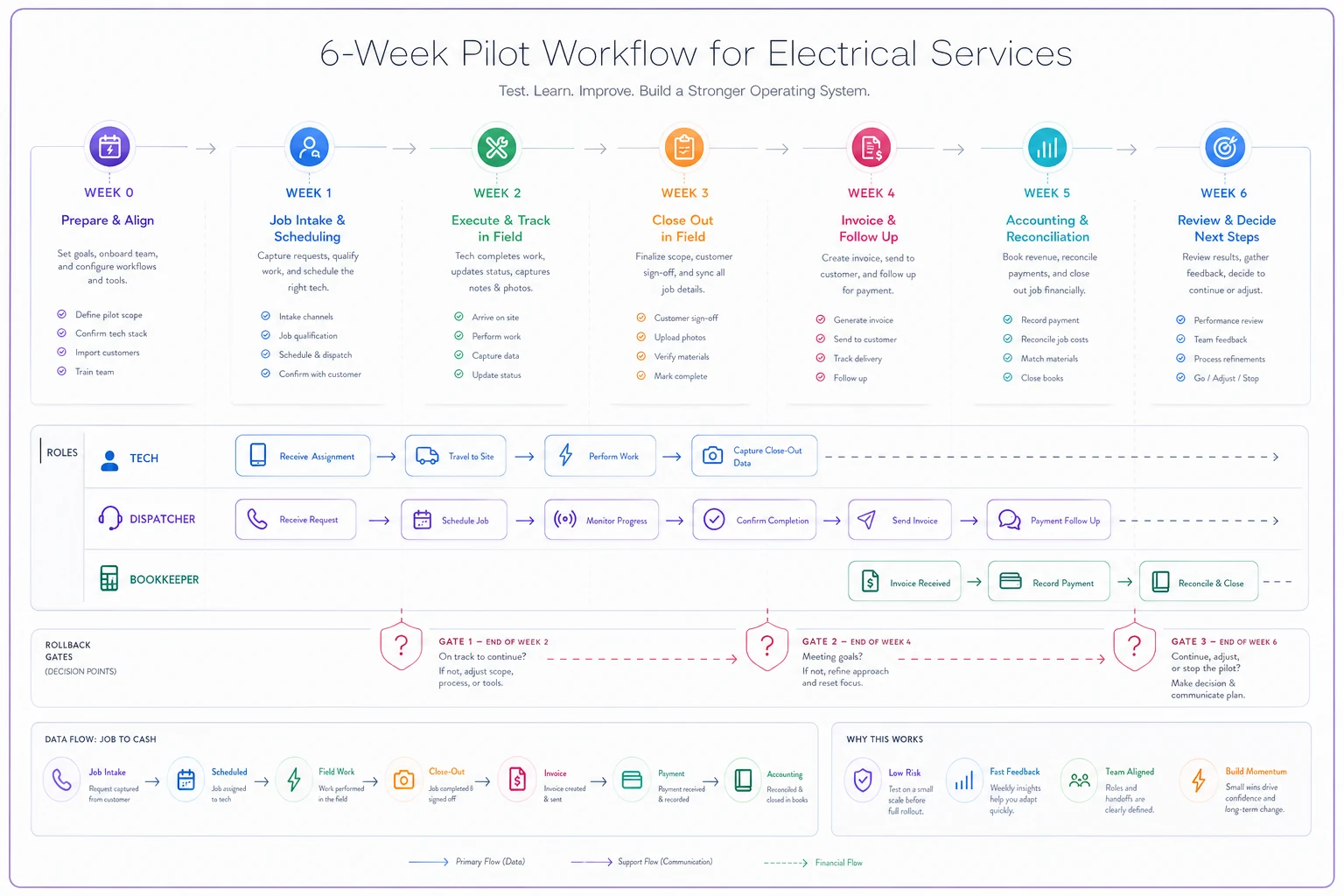
The image should make the handoffs and gates obvious so non-technical staff can follow the test plan.
Rollback gates: decide your exit before you need it
Almost nobody does this part, and it's what separates a pilot from a slow-motion commitment. A rollback gate is a condition you agree to before the pilot starts that triggers a pause, a fix or a full stop.
Write them in advance because of sunk cost. By week 4 you've loaded data, trained people and told the crew this is the future, and nobody wants to admit it isn't working. Gates written in week 0 take the ego out of it.
Set checkpoints at the end of weeks 2, 4 and 6. Typical gates for a small electrical shop:
-
Data loss gate (immediate stop) any job data, photo or payment record lost or corrupted that the vendor can't recover. Hard stop, no exceptions.
-
Cash gate (week 4) completion-to-invoice lag for the pilot crew is worse than baseline two weeks running, or there's a payment sync problem with no fix date.
-
Adoption gate (week 4) techs are falling back to paper or texts on more than roughly a quarter of jobs, and the reason is the tool, not habit.
-
Support gate (any time) a blocking issue goes unanswered for more than 2–3 business days.
-
Workload gate (week 6) the office is spending more total time per job than before. Some extra time in the first weeks is normal, but by week 6 it should be trending down.
Each gate needs a pre-agreed action, not just a red light. "Pause expansion, fix with vendor within 10 days, re-test" is a different response from "roll the pilot crew back to the old process." For a real rollback you need two things set up beforehand: the old system kept in working order (don't cancel it during the pilot), and a tested export of everything entered during the pilot so it can be moved back.
One small habit that helps: the person who checks the gates shouldn't be the one who championed the purchase. If the owner pushed for the tool, let the office manager or bookkeeper call the gates.
A real scenario: second attempt at a field platform
Business: residential and light commercial electrical contractor, 11 field techs, 2 office staff, owner still doing most estimates.
First attempt: they bought an all-in-one field service platform after a strong demo and paid annually. Everything went live company-wide in one weekend. Within about six weeks, roughly a third of jobs were being closed by text or paper again, mostly because the close-out flow didn't handle the shop's add-on items (extra circuits, surge protection) cleanly. Invoice lag went from around 4–5 days to closer to 8–10. The bookkeeper was applying payments by hand because deposits on install jobs weren't syncing correctly. They used it half-heartedly for about five months before admitting it was making things worse.
Second attempt: this time they scored three vendors with the scorecard. A tech scored close-out, the bookkeeper scored accounting sync. They ran a 6-week pilot with one 3-tech crew and wrote the rollback gates in advance.
The week 4 cash gate tripped. Progress payments on panel upgrade jobs were syncing as unapplied credits. Instead of pushing through, they paused expansion. The vendor fixed the mapping in about a week, and they re-tested in week 5. The gates did their job: the problem got caught on one crew's jobs instead of the whole company's.
Before vs after (pilot crew, then company-wide after a staggered rollout over about two more months):
-
completion-to-invoice lag
roughly 4–5 days → about 1–2 days
-
jobs closed with complete notes and photos without office follow-up
maybe 60% → consistently above 90%
-
bookkeeper time on payment matching
most of a day each week → a couple of hours
-
dispatcher calls to techs for job status
noticeably fewer, though they didn't track that well
Total software cost landed around $1,100–$1,400 a month, a bit higher than the first platform. The owner's verdict was blunt: the first tool was cheaper and cost them far more.
When this actually makes sense
A formal pilot with gates is worth the effort when the tool touches money or the daily field workflow: field service platforms, dispatch tools, payment systems, anything syncing with accounting. It's also worth it any time you're replacing something people use daily, since existing habits are the biggest adoption risk.
It makes the most sense from about 5–6 techs up. That's when you can isolate a pilot crew while the rest of the business runs normally, and when a company-wide failure starts to cost real money.
When this is a bad idea
A full 6-week pilot on a small, isolated tool is overkill. A review-request app, a fleet fuel card portal or a document scanner doesn't need gates and baselines. Try it for two weeks and decide.
-
Don't pilot during your worst possible stretch without meaning to, either. Starting week 1 at the edge of a heat-wave surge or right before year-end close means you'll measure chaos, not the tool. Week 5 should be the stress test, not weeks 1 through 6.
-
And don't pilot two major systems at once. If you change the field platform and the accounting system in the same quarter, you won't know which one caused the mess.
Don't pilot two major systems at once. If you change the field platform and the accounting system in the same quarter, you won't know which one caused the mess.
Who should NOT do this
Some groups should skip a formal 6-week pilot and use simpler approaches.
-
Owner-operators with 1–2 techs who do their own books. Pick something simple, use it for a month, and switch if it's bad. Your switching cost is low and a formal pilot is mostly overhead.
-
Shops with no documented workflows at all. If nobody can describe how a job goes from call to cash today, the pilot has nothing to measure against. Fix that first. A basic operations playbook with SOPs, handoffs and decision triggers makes the pilot far more useful, because you can test the tool against how you actually want to work.
-
Shops in the middle of a staffing crisis. If you're short two techs and the dispatcher just started, adoption will fail for reasons unrelated to the software, and you'll blame the tool.
If none of the above apply, a pilot is usually the safest path for tools that touch money or daily flow.
Where AI-assisted tools fit (without the hype)
Most field platforms now say "AI" somewhere on the pricing page. Some of it is useful, and some of it is a chatbot bolted onto a help menu. During selection, the useful question isn't "does it have AI?" It's "which step in our workflow does this remove or catch?"
The useful cases for small electrical shops are fairly unglamorous. AI automation is good at flagging incomplete close-outs before the invoice goes out, like a panel job with no photo of the finished panel, or an add-on that's in the notes but not on the invoice. It's good at catching sync mismatches between the field tool and accounting before month-end instead of after. It can turn a tech's rushed voice note into readable job notes, and it can spot patterns, like one crew consistently closing jobs a day late.
That makes AI-assisted operational software handy during the pilot itself. Some of the metrics above, like close-out completeness and sync exceptions, are a pain to track by hand, and an AI-assisted platform can surface them automatically every week. You get cleaner gate decisions without someone spending Friday afternoon in spreadsheets.
When vendors pitch AI features, ask three things. What data does it use? Can you turn it off per feature? Will it show you what it changed? Any feature that edits invoices or job records without a clear log is something to be careful with, not excited about.
After the pilot: rolling out without recreating the original mess
A good pilot result doesn't mean you flip the whole company over on a Monday. Roll out in waves of 3–5 techs, a week or two apart. Each wave gets the pilot crew's lessons, and ideally one pilot tech rides along or stays reachable for questions. Field techs trust another tech's "here's the shortcut" far more than an office training session.
Assign one internal owner for the system. It doesn't have to be a full-time role, but it has to be a named person who controls the pricebook, job types and configuration changes. Shops that skip this end up with five versions of the same line item within a year and reporting nobody trusts.
Keep the rollback gates active through rollout. Same metrics, checked every two weeks, until the whole company is live and steady for about a month. Problems that didn't show up with 3 techs sometimes show up at 15, especially in dispatch, where scheduling complexity grows faster than headcount.
Then update your SOPs to match the new tool and remove the old steps so people stop following them. Leftover instructions for the old process are one of the quieter reasons adoption slides back after a good start.
If you're early in all this, here's what to do in the next week or two. Write the one-page problem statement. Get a tech and your bookkeeper involved before any demo. Decide your Tier 1 integrations. Then take your baseline numbers, even rough ones, before you talk to a single vendor.
With those four things done, evaluating software stops being a sales experience and becomes a test you control.
Ready to optimize your electrical service operations?
Join 500+ electrical service companies using Voltzly to improve scheduling accuracy, enhance client satisfaction, and boost operational efficiency.